
Key Takeaways
- Instagram stories last 24 hours from the moment you post each slide. Not from midnight. From the exact minute that slide went up.
- In a multi-slide story, each slide has its own 24-hour timer. They expire one by one, not all at once.
- A single story video plays as one continuous clip up to 60 seconds. Longer clips split automatically into back-to-back 60-second segments.
- Photo slides display for 7 seconds each.
- There is no daily cap on how many story slides you can post.
- Stories auto-save to your private Stories Archive when they expire. Only you can see the archive.
- Viewer lists disappear 48 hours after posting, even if the story is saved to a Highlight.
- Highlights stay on your profile permanently, but they now live in a dedicated tab that is one extra tap from your main profile view.
- The 24-hour window is not a flaw. It is what makes people tap your profile in the first place.
How long do stories last on Instagram?
Instagram stories stay live for 24 hours from the moment you post them. After that, they expire from the public feed and move to your private Stories Archive, where only you can see them. Viewer data disappears after 48 hours, even for stories saved to Highlights.
Source: Instagram Features: Stories
The 24-hour clock is straightforward. Post at 9 a.m. on Monday and the story disappears at 9 a.m. on Tuesday.
What trips people up is thinking of a “story” as a single thing. It is not. A story is a collection of slides. Each slide has its own timer, starting at the moment it was uploaded.
Post three slides across 30 minutes, and the first one expires 30 minutes before the third one does. They do not expire as a batch. Each one goes on its own schedule.
This matters if you are posting story content across a long day. Your earliest slide might expire before a new viewer gets to it. If the sequence matters, post the slides closer together.
How long can an Instagram Story be?
A single story video clip can be up to 60 seconds long. Anything longer splits automatically into back-to-back 60-second clips. Photo slides show for 7 seconds. There is no daily limit on how many story slides you can post.
Source: Instagram Features: Stories
The old 15-second auto-split rule is gone. That changed a while back. A 60-second clip now plays as one uninterrupted segment. That matters if you are teaching something and do not want the cut to interrupt the flow.
For practical math: a 3-minute video becomes three back-to-back 60-second slides. Viewers can tap through them or watch the full sequence.
Most coaches find 30 to 45 seconds is the real sweet spot for educational story content. Long enough to teach one complete idea. Short enough that people actually finish it.
How do you post at maximum Instagram story length?
Upload a video up to 60 seconds. If it runs longer, Instagram splits it at the 60-second mark automatically. If you are filming inside the Instagram camera, recording stops at 60 seconds. You do not need to trim anything manually.
Uploading from your camera roll works the same way. Any clip over 60 seconds gets cut into segments by the platform.
Plan for it if you want control over where the cut lands. Film in deliberate 60-second blocks. Or use the auto-split as a structural device: end each clip on a question or a half-finished thought, and let the next segment deliver the payoff. That pattern keeps viewers tapping through instead of dropping off.
Before you film, make sure your dimensions are right. Story content is vertical. A clip that is sized wrong shows up boxed or cropped. The Instagram story dimensions guide has the exact specs so your video fills the frame correctly.
Why does someone’s story keep showing up after you already watched it?
Two reasons. First, the person added new slides after you watched, which reactivated their story ring. Second, Instagram surfaced the story again based on your engagement patterns with that account. New slides reset the ring, so familiar profiles can reappear in your feed the same day.
This is useful to know for your own posting. When you add a new slide to an active story, you come back to the visible front of the story queue for anyone who already watched your earlier slides. Not a new notification, but a fresh presence signal.
Posting story slides at a few different points across the day keeps you consistently visible without needing to publish an entirely new post each time. Each new slide is a small pulse on the feed.
What happens to your story after the 24 hours are up?
Instagram moves your expired story to your private Stories Archive automatically. Only you can see it. From there you can add slides to Highlights, save them to your phone, or leave them as a private record. Nothing is permanently deleted unless you turn archive off or delete a story before it expires.
Source: Instagram Help Center: Archive Instagram Stories or turn off Stories Archive
Two things worth knowing.
One: if you delete a story before the 24 hours are up, it does not go to your archive. It is gone permanently.
Two: music and GIFs in archived stories may show up muted or frozen due to licensing rules. That affects your private archive playback, but not the original story while it was live.
Keep your archive turned on. It is the bridge between your 24-hour story and your permanent Highlights. Turn it off and every story you post disappears for good when it expires.
Can you save your own Instagram stories?
Yes. Stories auto-save to your private archive when they expire. You can also save any slide to your camera roll manually while it is still live. The archive is private by default. No one else can see it.
Source: Instagram Blog: Introducing Stories Highlights and Stories Archive
To access your archive: go to your profile, tap the three lines in the top right corner, then select Archive. Stories are sorted by date.
From your archive, you can do three things:
- Add any story to a Highlight, whether it is still live or already expired
- Save individual slides to your camera roll for repurposing later
- Re-share old slides as new story content
The archive is one of the most underused features on the platform. If you post consistently, you are building a library of content you can come back to. Strong slides become Highlights. Highlights become your permanent credibility layer.
The real reason the 24-hour window is a feature, not a flaw
Here is what most articles about Instagram stories miss.
When someone sees your Reel in their feed, what is the first thing they do?
They tap your profile. And the first thing they look for is a story ring.
That colored circle around your profile picture. If it is there, they tap it. They want to know what you are up to right now.
This is instinctive behavior. When a piece of content catches your attention, you check the story. You want to see if this is a real, active person or someone who posted eight months ago and went quiet.
No story ring? They scroll away.
A live story? They tap. They watch. They decide whether you are worth following.
The 24-hour expiration is exactly what creates that pull. If stories lasted forever, nobody would feel any urgency about watching them now. The clock running out is the point. It signals presence. It tells a new visitor: a real person is active here, today.
This matters most when you go viral on a Reel. A post breaks out, hundreds or thousands of new people land on your profile, and the story you have up in that moment does real conversion work. Not your grid. Not your bio. Your story ring and what it leads to.
Think about the sequence. Reel gets watched. Viewer taps your profile. Story ring is live. They watch and get a feel for who you are. Then they decide whether to follow. That decision happens in about 20 seconds. A live story keeps it open. No story closes it.
What your stories should actually communicate to new viewers
Hold up. Do I need some elaborate content strategy just to post a story?
No. You need one thing. A clear signal that says: I’m here, and I’m talking to you specifically.
This is where CCN comes in.
CCN stands for Core Content Niche. The idea is that every piece of content you make should be aimed squarely at the specific person you serve. Not at everyone who might find you broadly interesting. Not at the largest possible audience. At your person.
Your stories work the same way as your Reels in this respect. The CCN is the filter.
If you coach clients through difficult relationship transitions, your story should sound like you are speaking directly to someone in the middle of that. If you work with new parents who want better tools for raising their kids, your story should feel made for that parent specifically, not for a general audience.
Here is why this matters when a Reel sends you a surge of new visitors.
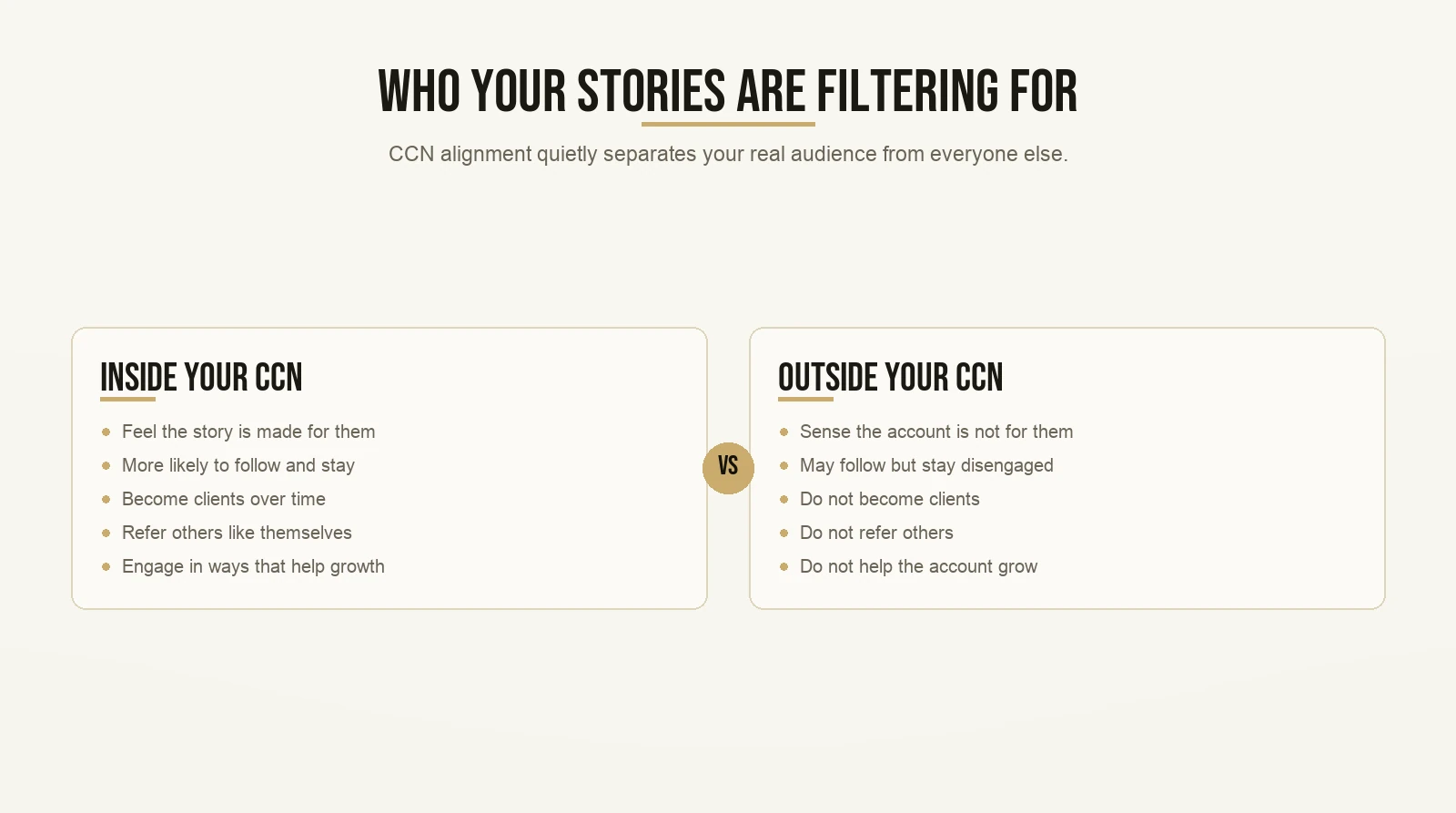
Most of those visitors are curious but undecided. They liked the post. They are not sure yet if you are someone they should follow. A story that speaks directly to your CCN acts as a filter. It tells your real audience: you are exactly in the right place. It tells everyone else that this account might not be for them.
That filter is not a loss. Followers outside your CCN do not become clients. They do not refer others. They do not engage in any way that helps your account grow. The people inside your CCN do. A story aligned with your CCN does the filtering quietly, while you are not even watching.
The two-layer system: stories and the credibility bank

Stories and Highlights do two completely different jobs. Most people treat them as the same thing. They should not.
Stories are your live pulse. Temporary by design. Their job is to signal that you are present and active, start conversations, and give new visitors a reason to follow right now. They do not need to be polished productions. A 30-second clip from your morning, a quick tip, a question for your audience. Anything that communicates: a real person is here, today.
Highlights are your credibility bank.
The credibility bank is Max’s framework for turning your Highlights tab into a structured, permanent case for why someone should work with you. Not a random collection of old story slides dumped into folders. A curated system built on three pillars.
Pillar one: your journey. Who you are, what brought you to this work, and why you do it. This gives context. A new visitor should be able to understand in 30 seconds who they are dealing with and why it is worth paying attention.
Pillar two: your method. The specific approach or framework that sets you apart from everyone else who says they do something similar. Not “I help people get healthier.” The particular system you use, the named thing, the framework. If you have developed a process with a name, put it here. If you have not, this is the prompt to think about what makes your approach distinct. Named, specific methods are more convincing than vague descriptions every single time.
Pillar three: your proof. Testimonials, screenshots, client results, before-and-afters. Here is the part most coaches skip because they think they do not have enough yet. You do not need a hundred. Two grateful clients who sent you a message is enough to start. Screenshot it. Put it in. A 10-second video from a happy client beats a blank Highlight every time. Start with what you have and build from there.
The credibility bank works while you are offline. Every new visitor who taps through your Highlights is walking a structured path that answers the questions they would ask if they were evaluating you in person. Your story ring gets them there. Your Highlights close the case.
For an idea of what strong proof content looks like in practice, you can browse examples from real creators and coaches on Max’s student results page.
For the practical setup of your Highlights from scratch, the guide on how to make Highlights on Instagram walks through every step.
What changed with Highlights in late 2024
This is a super duper key update if you set up your Highlights before mid-2025 and have not reviewed them since.
Instagram moved Highlights out of the bubble row under your bio and into a dedicated tab. The tab shows vertical thumbnails instead of the old circle bubbles and is marked with a heart icon. The redesign launched in November 2024 and was broadly live by around mid-2025.
Instagram’s head, Adam Mosseri, explained the reasoning: “We’re trying to improve the profile and get more content above the fold. We don’t need to have pogs and squares pushing everything down.”
What this means for your credibility bank: it is now one extra tap away from your main profile view. Visitors who land on your profile do not see your Highlights immediately. They have to actively tap into the tab.
Two things matter more now than they did before the redesign.
Cover images. When someone opens the Highlights tab, the vertical thumbnails are the first impression. A clear, recognizable cover image for each Highlight does real work now. It has to communicate what is inside before the visitor taps.
Highlight names. Short, direct labels beat vague ones. “My Story,” “How I Work,” and “Client Results” are better than “Memories” or “Favorites.” A visitor scanning the tab should know exactly what they are getting before they click.
The credibility bank is still the right strategy. The tab redesign just means you need a clearer sign out front for each section.
How the full conversion sequence works in practice
Put everything together and you have a system.
Someone sees your Reel. They tap your profile. Your story ring is live, so they watch it. The story speaks to your CCN, so your real audience recognizes it is for them. They tap over to the Highlights tab. Your credibility bank is there: your journey, your method, your proof. They follow. Days later, they send a DM.
That is the path. Every step feeds the next one.
Stories handle the “is this person real and active today?” question. Highlights handle the “is this person right for me?” question. Reels bring the traffic. The profile is where the decision actually happens.
Boom. That is the whole system.
If you want to build out the Reel side of this so you are consistently sending new traffic to your profile, the guide on how to go viral on Instagram Reels covers that from the ground up.
And if you are not sure what to post in your stories or your feed on a regular week, what coaches should post on Instagram when they run out of ideas gives you a working framework for keeping content moving without grinding yourself down.
A quick note on viewer analytics
One practical detail worth knowing.
Viewer lists on your stories are only visible for 48 hours after you post. Instagram removes this data after that window closes, even for stories saved to Highlights. The Highlight stays visible. The viewer list does not.
If you want to identify your most engaged viewers for any kind of follow-up, check your story viewer list within 48 hours of posting. After that, the data is gone permanently.
Can you schedule Instagram stories in advance?
Hold on. Can’t I just batch my story content ahead of time and schedule it all out?
Not yet. As of April 2026, Instagram’s Adam Mosseri confirmed that story scheduling is still under active internal debate at Meta, but it has not launched. The platform has intentionally kept stories unschedulable to preserve the real-time feel of the format.
In practice, this means stories need to be posted in the moment or close to it. Plan the general idea for your story content, but film on the day. That spontaneity is part of what makes the story ring work as a presence signal. The “what are they up to right now” reflex only fires when the content actually looks current.
Want the templates behind content that actually gets watched? Grab the templates here and start with the first one today.