
Key Takeaways
- Instagram templates live in three places: the Reels editor (Template Browser), Instagram Stories (the Add Yours sticker), and the Edits app (creator-led project files).
- The Template Browser has three tabs: Recommended, Trending, and Saved. Start on Trending for reach; go to Saved for consistency.
- A Reel only qualifies as a template if it includes music and at least three clips. Single-clip or music-free Reels cannot become templates.
- The “Template by” button shows how other creators already remixed the same format. Use it to find the angle nobody else took – that gap is where your version goes.
- Meta’s March 2026 originality policy says templates with a genuine new perspective are treated as original content. Templates with no real angle may be deprioritized.
- The template is the container. Your point of view is the actual content.
What Are Instagram Templates, Exactly?
Templates are pre-built Reel structures you fill with your own clips. The audio, number of clips, clip durations, and AR effects are already set. You swap in your footage and publish. Photos work in the clip slots too, so the same steps give you a Reel built from photos.
That is the mechanical answer. Here is the one that matters more for your business: a template is a structure that already got views. When you use it, you inherit the pacing, the audio trend, and the proven clip format. What you add on top – your angle, your hook, your call to action – is the actual content that determines your results.
There are three types of templates on Instagram right now. Reels templates in the native app. Stories templates via the Add Yours sticker. And creator-led project file templates in the Edits app. Each one does a different job. Let me walk you through all three.
How Do You Find Templates for Instagram Reels?
Open the Instagram app, tap the plus icon to create a Reel, then tap the Templates tab at the bottom of the Reels editor. You will see three tabs: Recommended, Trending, and Saved. Tap Trending to start.
Recommended shows templates based on your past behavior and niche. Trending shows templates gaining speed right now. Saved shows templates or audio you have already bookmarked to return to later.
To save a template from the feed, tap “Use Template” on any Reel that shows the label, then bookmark it to come back to it when you are ready to film.
According to Instagram, when you create from a template, the audio, number of clips, clip durations, and AR effects are automatically applied. Text and transitions are pre-loaded too. You can add or remove clips and adjust timing from there.
One thing worth knowing before you start: not every Reel can be used as a template. A Reel only qualifies if it includes music and at least three clips. If you tap a Reel in the feed and there is no “Use Template” button, that is the reason.
What Does the “Template by” Button Actually Tell You?
The “Template by” button shows you how other creators have already remixed the same template. Tap it before you fill in your own clips, scroll through the existing versions, and find the gap – the angle nobody in your niche has made yet. That is where your version goes.
Most people tap “Use Template” and go straight to filming. Do not do that.
The remixes tell you two things. First, which takes are already saturated. Second, which take is missing. In any batch of remixes, you will find five versions saying roughly the same thing and one empty slot. Fill the slot.
Here is a quick example. If you are a sleep coach and every remix of a template says “turn off your phone” or “try melatonin,” and nobody said “the real reason you cannot sleep is your cortisol pattern at noon,” you have an angle. That angle is what makes your version worth watching. The structure of the video is already built for you. Your job is the idea.
How Do You Find Templates for Instagram Stories?
Open the Stories camera and tap the Templates button in the toolbar. It surfaces trending Add Yours prompts you can jump into immediately. Tap the Add Yours sticker in the sticker tray to start your own prompt or join an existing chain.
Instagram’s Stories guide explains the mechanic: when you build an Add Yours template, you choose which elements get pinned. Respondents can add to your pinned elements but cannot change them. That means your original framing stays intact as the chain spreads.
The Add Yours Music sticker works on the same principle. It starts a chain around a song or a mood, and anyone can extend it. Your Story stays visible as the origin of the chain as it moves through other people’s audiences.
Most creators use this sticker as decoration. There is a smarter play, and I will cover it in the Add Yours section below.
What About the Edits App?
The Edits app is Meta’s standalone video editor. It handles template creation at a more detailed level than the native Reels editor – useful when you want to study or build complex video structures from scratch.
In April 2026, Meta introduced creator-led templates with editable project files inside Edits. Named creators share the actual project file – not just the finished video. You can see exactly how a video was built at the cut level: the transitions, the timing, the structure. You then adapt the technique. Creators are automatically credited when their template is reused.
Instagram also added fine-tune control over the position, scale, and rotation of video assets in Edits that same month.
In September 2026, Edits added First Draft: a one-tap rough Reel edit from a batch of clips, with auto-trim of pauses on talking-head footage. iOS only at launch. It is a fast way to get from raw clips to a publishable structure without building from scratch.
Hold up. Do I need the Edits app if I am already using the Instagram app?
Not for basic templates. The native Reels editor handles most use cases. Use Edits when you want to study how a high-performing creator built a specific video at the structural level, or when you want to build reusable project files for your own content format.
Will Using a Template Hurt Your Reach?
No – if you add a genuine new perspective. Yes – if you just swap clips with no distinct angle. Meta updated its content policies in March 2026 and drew a clear line between templates that add new information and templates that simply copy a structure.
The policy: Reels that incorporate templates are original content when the creator adds new information, analysis, or a substantially new perspective. Reels that duplicate another creator’s structure without adding value will be deprioritized.
Read that again.
The template is not the content. It is the container. A container filled with a fresh angle is original content. A container filled with generic clips and no real point of view is filler. The algorithm treats them differently, and that gap is exactly what most template tutorials never tell you.
They stop at “here is where to tap.” The question that actually determines your reach is: what do I put inside it?
Contrarian Ideology: The Framework That Makes Your Template Original

One of the frameworks I teach is called contrarian ideology. The name sounds intense. The concept is not.
Every niche has a pile of advice that everyone repeats. The same talking points, the same tips, the same angles. Your audience has heard all of them a hundred times. Contrarian ideology means finding the one thing that is true but that nobody else is saying – or finding the widespread assumption in your niche that you can specifically disprove.
But Max, how contrarian do I need to be? I do not want to just disagree with everyone for the sake of it.
You do not disagree for the sake of it. You find a specific belief your audience holds that is slowing them down, and you correct it with something concrete. If every fitness coach says “calorie deficits are all that matter” and you know that dozens of people fail on perfectly tracked deficits because of cortisol and sleep quality, say that. Specific. True. Different. That is contrarian ideology. You get the gist.
Here is why this connects directly to templates. Meta’s March 2026 policy says templates with a “substantially new perspective” are treated as original content. Contrarian ideology is exactly the mechanism that produces a substantially new perspective. Your angle is what makes the template original – algorithmically and for your audience.
Pick a trending template. Scroll through the remixes. Find the take everyone else is making. Then find the one specific thing that is true and that nobody said. Film that. The structure of the video is already built. Your job is the idea.
The 7 Building Blocks: What You Need to Check Before You Hit Publish

Before you publish any template Reel, check two specific things from Max’s 7 building blocks framework. The 7 building blocks are the structural components that separate videos that spread from videos that stall at a few hundred views. Two of them apply directly to template use.
The loop ending. Play the template through to the last frame. Does it flow cleanly back into the opening shot? A loop ending means the video feels like it starts over when it finishes. The viewer does not notice the ending. They watch again. Boom – that pushes your average watch time above 100%, which the algorithm reads as strong demand for the content. When you select a template, play it all the way through and watch the transition back to the beginning. If the original creator built a loop in, that is a structural advantage you are inheriting. If the video stops cold, adjust your last clip to connect back to your first frame.
The CTA. Every template Reel should end with exactly one call to action. Max teaches three options, depending on your goal:
- To build a following: “Follow for more [your topic].”
- To send people to a freebie and build trust: “Comment [keyword] and I will DM you the link.”
- To send people to a paid product: “Comment [keyword] to get the link.”
Most creators skip this entirely. They use the template, fill it with clips, and publish with no next step. The view happens and nothing follows. The CTA is what converts a view into a business result. Without it, you are working for reach and nothing else.
One CTA. Specific. At the end. That is the building block most template users leave out.
For more on building Reels that do more than just get watched, see how to make Instagram Reels that convert to sales.
How Do You Pick a Template That Actually Builds Your Business?
Look for a template with a clean loop ending, enough clips for at least one talking-head moment, and a remix feed where your angle is missing. Those three conditions together mean you can make something original that also exits with a strong CTA.
Here is the selection process, step by step.
Step 1: Match the structure to your CTA. If you plan to ask people to comment a keyword, you need at least one clip where you can deliver the ask directly to camera. A template built entirely of fast jump cuts with no room for voice will not carry a verbal CTA well.
Step 2: Check the loop. Play it through and watch the last frame connect back to the first. A clean loop is a structural advantage already built into the template. It is worth selecting for.
Step 3: Browse the remixes. Open “Template by” before you start filming. See what others in your niche did with it. Then ask yourself: what angle has nobody taken yet?
Step 4: Apply the contrarian ideology check. Before you shoot anything, finish this sentence: “Everyone in my niche says X, but actually Y.” If you cannot finish it, you do not have an angle yet. Keep developing the idea before you pick up your phone.
Hold up. That sounds like a lot of work just to use a template. Is not the whole point that templates are fast?
The build is fast. Fifteen minutes once you have your clips. The angle development takes another ten. But that ten minutes is the difference between a video that gets treated as original content and one that gets deprioritized as a copy. That math works. Every time.
If you want to go deeper on finding topics and angles before you open the camera, how to go viral on Instagram Reels covers the topic selection side in detail.
Why Does the Add Yours Sticker Beat Regular Stories Templates?
The Add Yours sticker starts a public chain. When your followers respond, their response appears in front of their own audiences and links back to your original Story. A regular Stories template stays inside your existing reach. Add Yours extends it.
Most creators use Add Yours to join a chain that is already running. That is fine for trend participation. The stronger play is to start a chain around a question your audience is already asking – one that leads back to your profile and your freebie.
Here is the setup. Create a Story with an Add Yours sticker. Make the prompt specific to your niche. Not a generic “share your morning routine” prompt. Something your target audience would genuinely respond to because it connects to their actual situation.
When followers respond, their Stories link back to yours. Their followers see the chain, visit the origin, and land on your profile. If your bio points to a freebie or a next step, some percentage of those profile visits convert to follows or DM conversations.
It is a community mechanic in the shape of a sticker. Most creators treat it as decoration. Treat it as an entry point into your freebie and CTA pipeline instead.
If you already have an audience and want to understand how Stories can qualify the people coming in, how to use Instagram story polls to qualify coaching leads covers the qualification layer in detail.
What Does a Complete Template Workflow Look Like?
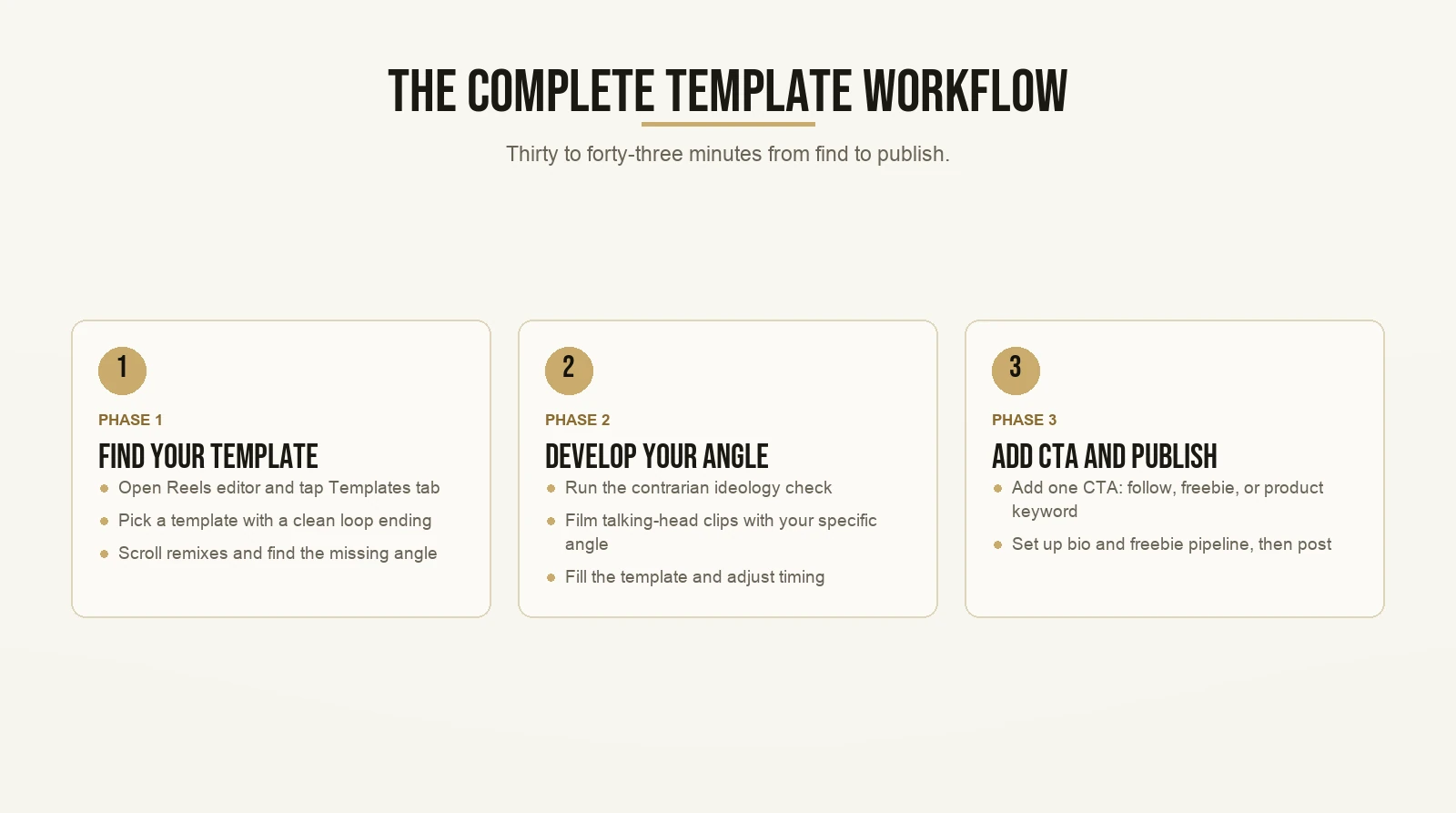
The full workflow is: find the template, study the remixes, develop your angle, check the loop, film your clips, add one CTA, and publish. It takes about thirty to forty-five minutes from start to publish once you have your idea locked.
Here is the end-to-end version.
- Open the Reels editor and tap the Templates tab. Start on Trending.
- Find a template with a clean loop ending and at least one talking-head clip slot.
- Tap “Template by” and scroll through the existing remixes. Find the angle that is missing.
- Run the contrarian ideology check: what does everyone else say, and what do you say instead?
- Film your clips with your specific angle in the talking-head moments.
- Fill the template. Adjust timing if needed.
- End with one CTA: follow, freebie keyword, or product keyword.
- Post.
For Stories: use Add Yours with a prompt your audience will respond to because it connects to their specific situation. Set up your bio and your freebie pipeline before you run the chain so the profile visits have somewhere to land.
For complex builds: open Edits, browse creator-led templates, study the structure at the project file level, and adapt it. Once you have a format that performs consistently, build your own reusable project file so you are not starting from scratch each time.
Creators who use templates as a content shortcut and skip the angle step will post consistently and stay flat. Creators who treat the template as the scaffold and the angle as the real work – those are the ones who get treated as original and reach audiences beyond their existing followers.
If you want to understand how these frameworks apply to growing a service business on Instagram, you can read more about how Max approaches creator growth.
Want the templates behind content that actually gets watched? Grab the templates here and start with the first one today.
Frequently Asked Questions
Do you need to credit the original creator when you use a Reel template?
Instagram handles credit automatically. When you create from a template, the “Template by” label appears on your published Reel and links back to the original creator. You do not need to add a manual credit in your caption.
Can you use any Reel as a template?
No. A Reel only qualifies as a template if it includes music and has at least three clips. Single-clip Reels and music-free Reels will not show a “Use Template” button.
Does using a template hurt my reach?
Not if you add a genuine new perspective. Under Meta’s March 2026 policy, a template filled with new information or a substantially new angle is original content. A template with generic clips and no distinct point of view may be deprioritized by the algorithm.
Where is the Templates tab in the current version of the Reels editor?
It is directly at the bottom of the Reels editor. Instagram simplified the navigation path. You no longer need to tap the gallery icon first. Older tutorials showing the gallery icon path are describing a deprecated flow.
What is the difference between the Add Yours sticker and a regular Stories template?
A regular Stories template is a visual design you fill with your own content. Add Yours is a sticker that starts a public chain. When your followers respond, their response appears in front of their own audiences and links back to your original Story, extending your reach beyond your existing followers.