
Key Takeaways
- How to use templates on Instagram the right way starts with one decision: keep the clip timing and structure. Replace the audio, text, and point of view.
- Instagram uses visual fingerprinting to detect content that resembles existing content. Using the same template AND the same trending audio stacks two originality penalties at once.
- Two frameworks make this practical: contrarian ideology and the credibility bank. Both are explained below.
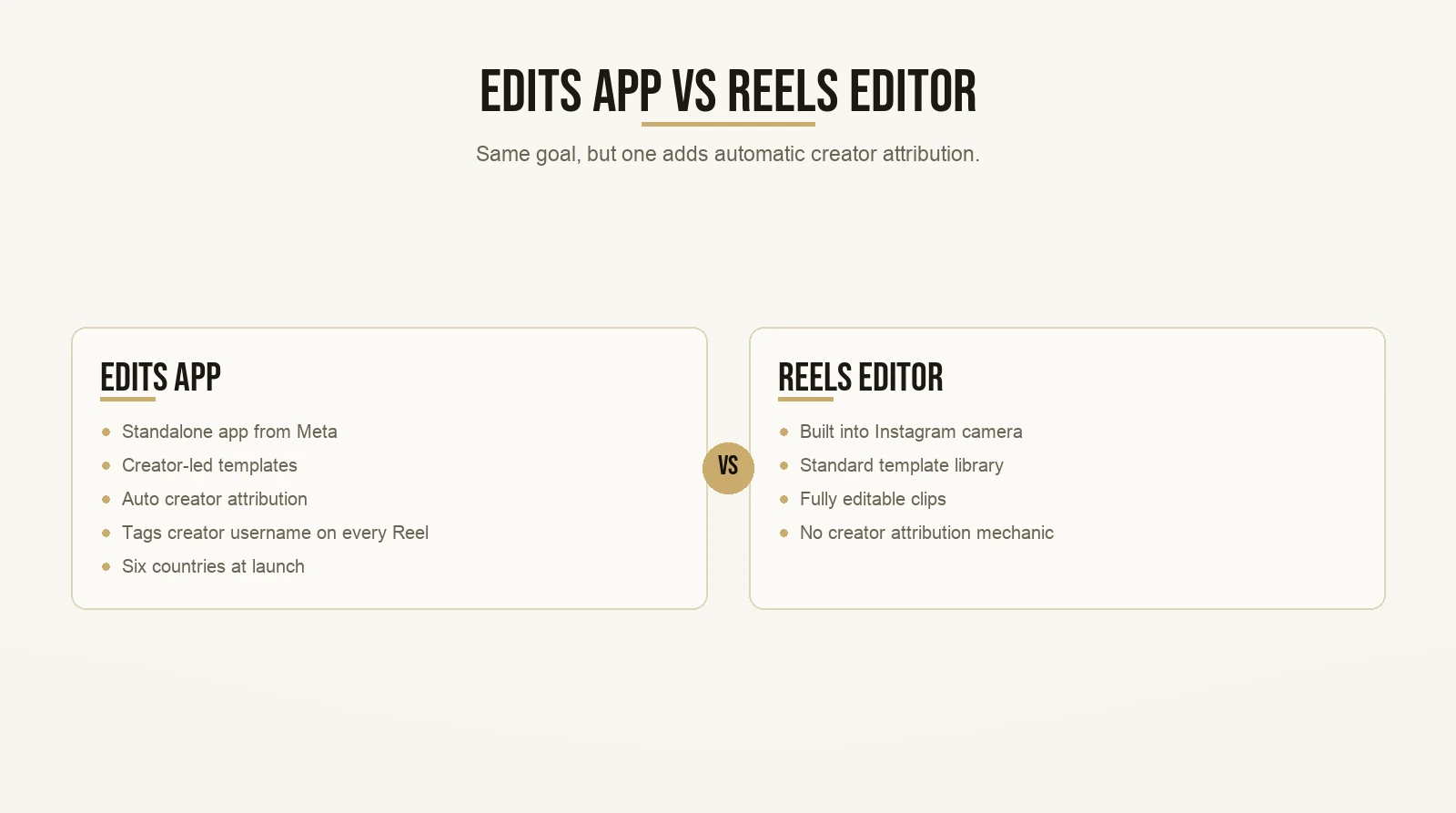
- The Edits app, updated in April 2026, lets creators publish editable project files. Every Reel made from your template automatically credits your username as the source.
What Are Instagram Templates, Exactly?
Templates pre-load the audio, clip slots, clip timing, transitions, text styles, and AR effects from an existing Reel. You swap your footage into the pre-set slots. Everything else stays locked until you choose to change it. Any Reel with three or more clips can become a template.
Instagram’s official templates update page explains the mechanic directly. When Meta first launched templates in 2022, the description was plain: the template “pre-loads the audio and clip placeholders, so all users have to do is add and trim their unique clips.” You can read that original launch announcement here.
One detail most tutorials miss: since 2023, templates also pull text overlays and transitions from the source Reel, not just the audio and clip slots. If a guide tells you templates only pre-load audio and timing, it is out of date.
How Do You Find and Use Templates on Instagram?
Open Instagram, tap the camera icon, go to Reels, and tap Templates at the bottom of the screen. You get a browsable library of Reels available for use. Pick one, add your footage into the pre-loaded clip slots, and post. The audio, text, and transitions stay in place unless you edit them.
For a full step-by-step of the navigation, this guide to finding templates on Instagram covers the complete flow.
One thing to know before you start: not every public Reel is available as a template. The original creator has to enable it. Instagram only surfaces the Reels that have been opened for reuse.
Does Using a Template Make Your Reel Look Like Everyone Else’s?
It can. That is the risk most tutorials never address. If you keep the same trending audio and post something that looks like fifty other Reels from this week, the algorithm has catalogued the combination already. Your viewer has seen it already. Neither treats it as new.
The solution is not to avoid templates. It is to understand what part of the template is working for you and what part is working against you.
The structure, meaning the clip count and timing, is invisible to your viewer. They do not know what source Reel you used. They only experience the pacing. That part is safe to borrow.
The audio, the on-screen text, and the point of view are what make two Reels look and sound identical. Those are the parts you replace.
The Originality Problem Nobody Is Talking About
In December 2025, Instagram head Adam Mosseri posted a 20-slide statement about where the platform is headed. The core message: the bar is shifting from “can you create?” to “can you make something that only you could create?”
He said Instagram would rank more strongly for originality. His post makes the point directly: visual fingerprinting will become the standard tool for identifying recycled content. As AI makes polished content cheap, raw and specific content becomes the signal of a real person.
So here is the tension. Templates give you a shortcut to a format that has already proven it can perform. But using a template with no modification is a shortcut to looking like everything else the algorithm has already catalogued.
Those two things are in direct conflict. The creators who resolve that conflict understand the next two frameworks.
Contrarian Ideology: How to Use the Same Structure Without Saying the Same Thing

Most people use templates to look like the Reels that already went viral. I understand the logic. You see something that performed well, you use the same format, and you hope the result follows.
Here is the problem. Every creator in your niche is making that same move. The template that went viral last week is being used by a hundred accounts this week. The algorithm has seen it. Your viewer has seen it. The urgency that made the original Reel work is gone.
Contrarian ideology is a framework for standing out by taking the opposite of the obvious move. The name sounds like a textbook, I know. But the mechanism is simple. You look at what everyone in your niche is posting, find the consensus position, and build a take that cuts against it in a way that is specific and earned from your real experience.
Here is what that looks like with templates.
Say the trending template in your niche is a “three things I stopped doing” Reel. Coaches are doing it. Business owners are doing it. The audio is on every other scroll.
Your move: same template structure, completely different take. “Three things everyone told me to stop doing, and why I kept all of them.” Same three-clip format. Same timing. Different audio. A position nobody else in your feed is taking.
Max, isn’t that just being contrarian for the sake of it?
No. The take has to be specific and defensible. “Most people are doing it wrong” is noise. “Most coaches cut their posting frequency when leads dry up, and that is the exact reason leads stay dry” is a specific, arguable, useful claim. Read that again. One is generic contrarianism. The other is information. That is the difference between a post that annoys people and one that makes them follow you.
The algorithm rewards originality. Your viewer rewards perspective. Contrarian ideology, done right, delivers both at once. And because you borrowed a structure that already performs, you are not starting from scratch. You are taking a proven container and filling it with something only you could say.
That is a freaking powerful combination.
The Credibility Bank: What You Actually Deposit Into the Template

Here is the second framework.
The credibility bank is the account you build with your audience every time you give them something specific that they could not get from anyone else. Yeah, it is a bit of a name. But the mechanism is worth understanding.
Every piece of content you post is either a deposit or a withdrawal. Deposits are moments where you explain a mechanism from your real work, share a specific observation, or take a position only someone with your exact experience could hold. Withdrawals are generic content your viewer has already seen somewhere else.
Over time, accounts with more deposits than withdrawals build trust fast. Accounts that keep making withdrawals go flat.
Now apply this to templates. The template is not a deposit. The template is the container. What you put inside the container is the deposit. Read that again.
Hold up, Max. If the structure is borrowed, how can the content inside it count as original?
Because your viewer never sees the structure. They see you, your face, your voice, your specific claim about something they care about. They do not know the source Reel exists. What they experience is what you said, not the editing pattern you used to say it.
Two creators can use the exact same Reels template. Creator A fills the clip slots with stock footage and captions borrowed from another post. Creator B films themselves, explains one mechanism from their real work, and makes a specific claim about why it works. Both Reels look almost identical in the editor. On the feed, they read as completely different posts.
Creator A is making withdrawals. Creator B is making deposits. That is the credibility bank in practice.
This is very very key if you are a business owner or coach using Instagram to get clients. Your viewer is not going to hire you because you used a smooth transition. They will hire you because they believe you know something they need. Every Reel is a chance to prove that. The template is the delivery vehicle. You are responsible for the cargo.
How to Use Templates on Instagram: The Three-Layer Swap
Here is the practical process. When you pick a template and load your footage, make three swaps before you post.
Swap one: the audio.
This is the biggest lever. The trending audio is what makes two Reels sound identical to the algorithm and to your viewer. When you replace it, the Reel reads as new content even if the structure is familiar. Use your own voiceover, music you have licensed, or no music at all. Let what you say carry the Reel.
Swap two: the on-screen text.
Templates now pre-load text from the source Reel. The default copy is either the original creator’s words or a placeholder. Rewrite every word. This is where contrarian ideology goes: your specific take, in your language, making a point nobody else in your niche is making right now.
Swap three: your real environment.
Generic content looks generic partly because it is filmed in generic places. Your actual workspace, your home, a setting tied to what you actually do: these signal authenticity. Mosseri specifically said raw content is becoming the credibility marker as AI-polished content gets ubiquitous. Your real environment is a feature, not a liability to fix.
Do all three swaps and you have a proven structure with none of the originality penalties. That is how to use templates on Instagram without looking like everyone else.
For more on what to say inside those clip slots, this breakdown of filming Reels on your phone that convert to sales goes deeper on the content layer.
What Changed With the Edits App in April 2026?
The Edits app added creator-led templates at its one-year anniversary update in April 2026. These are editable project files published by named creators. Every Reel built from one automatically credits that creator’s username.
This is a different mechanic from the Reels editor. In the Reels editor, you use a template and the connection to the source Reel is invisible to everyone. In the Edits ecosystem, the connection is public and persistent.
For you as someone building a brand, publishing templates in Edits is a distribution play. Every Reel someone else makes with your template puts your username in front of their audience. The more useful your template is, the wider your name spreads. That is distribution without posting more often.
The Kits feature, rolling out through 2026, lets you save colors, caption styles, and audio choices as a named preset inside Edits. It keeps your brand consistent across every project without rebuilding settings each time. Pretty straightforward, once you set it up once.
What Are the Biggest Mistakes People Make With Instagram Templates?
Mistake one is using the template and the trending audio together. This is the double penalty. The structure is borrowed and the audio is identical to dozens of Reels posted this week. Neither layer has anything original. The algorithm has catalogued this exact combination. It will not push it hard.
Mistake two is picking a template because it looks good rather than because the structure fits the story you need to tell. The result is polished, empty Reels. The clip count and timing feel professional. The content communicates nothing specific. Polished and generic performs worse than rough and specific, especially now that the platform is explicitly rewarding things only you could make.
I have watched both of these mistakes play out the same way every time. Good production value. Low distribution. A creator who cannot figure out why.
Pick the template because the clip count and pacing match what you are trying to say. Not because it trended last week.
Where Templates Fit in a Strategy That Actually Gets You Clients
Templates solve an execution problem. They do not solve a content problem.
The content problem is this: what specific, original, useful thing are you going to say? That is a contrarian ideology problem and a credibility bank problem. Solve that first. Then the template makes your execution fast. That is the right order.
Instagram now has nearly two billion advertising accounts and three billion monthly active users as of 2026. The feed is freaking crowded. Getting seen once is not enough. Getting followed requires that a viewer, on the first or second watch, thinks “this person knows something I want to know more of.”
That is a credibility bank problem. Templates help after you solve it.
If you are figuring out how templates fit into getting actual clients from Instagram, this breakdown of how to find clients on Instagram walks through the content-to-client pipeline. If you are newer to the Reels format itself, this guide to Instagram Reel templates covers the structural basics from the ground up.
You can also read more about how Max Tornow approaches Instagram growth if you want the full framework behind these ideas.
Frequently Asked Questions
How do I use templates on Instagram Reels?
Open the Reels camera in Instagram, tap Templates at the bottom of the screen, and browse the available library. Select a template, add your footage into the clip slots, and post. The audio, text overlays, and transitions are pre-loaded and fully editable. Any Reel with three or more clips can be enabled as a template by its creator.
Does using Instagram templates hurt your reach?
Only if you use them without modification. The structure itself is not the problem. Keeping the same trending audio and on-screen text as the original Reel is. Instagram uses visual fingerprinting to detect recycled content. Swap the audio, rewrite the text, and film original footage, and the structure works in your favor.
Can I use any Reel as a template?
No. Only Reels with three or more clips that the original creator has enabled as a template appear in the Templates library. Not every public Reel is available. The creator has to opt in for the template option to show up for other users.
What is the Edits app and how does it differ from the Reels editor?
Edits is a standalone video editing app from Meta. At its April 2026 update, it added creator-led templates with automatic creator attribution. Every Reel built from a creator’s Edits template tags their username. The standard Reels editor does not include that attribution mechanic. Creator-led templates in Edits are currently available in the US, UK, Canada, Australia, New Zealand, and Ireland.
How do I make a template feel original?
Three swaps: replace the audio with something original, rewrite every line of on-screen text with your specific take, and film in your real environment. Keep the clip count and timing intact. Those are the invisible structural parts that make the format work. Everything your viewer actually sees and hears should come from you.
Want the templates behind content that actually gets watched? Grab the templates here and start with the first one today.