
Key Takeaways
- The standard Instagram carousel size is 4:5 portrait at 1080 × 1350 px. It works in the app and through every scheduling tool.
- Instagram added 3:4 portrait (1080 × 1440 px) in May 2025. It works in-app only. Scheduling tools reject it.
- The first slide sets the aspect ratio for the whole carousel. Every other slide auto-crops to match.
- The Instagram profile grid switched to 3:4 vertical thumbnails in January 2025. A 3:4 carousel fills the grid tile with zero crop.
- Carousel limit: 20 slides in-app, 10 slides through the API (scheduling tools).
- If you batch-produce and schedule posts, build your carousels at 4:5 until the Meta API supports 3:4.
What is the standard Instagram carousel size?
The standard is 4:5 portrait, 1080 × 1350 pixels. It works in the app, through scheduling tools, on every device, and for every carousel type. Per Instagram’s official photo guidelines, the accepted aspect ratio range is 1.91:1 (landscape) to 3:4 (portrait). Images outside that range get auto-cropped before they post.
Here are all four supported formats and where each one actually works.
| Format | Dimensions | In-app | Scheduler/API |
|---|---|---|---|
| 4:5 portrait | 1080 × 1350 px | Yes | Yes |
| 3:4 portrait | 1080 × 1440 px | Yes (May 2025) | No |
| 1:1 square | 1080 × 1080 px | Yes | Yes |
| 1.91:1 landscape | 1080 × 566 px | Yes | Yes |
That third row is what is tripping creators up right now. Let’s crack into it.
What changed with Instagram carousel sizes in 2025?
Two things changed. Most creators have only heard about one of them.
May 2025: Instagram head Adam Mosseri announced: “Instagram now supports 3:4 aspect ratio photos – the format that almost every phone camera defaults to. From now on, if you upload a 3:4 image, it’ll appear just exactly as you shot it.” Before this update, a 3:4 photo got cropped or padded with black bars. Now it posts as-is. This applies to both single photos and carousels.
January 2025: Instagram changed the profile grid from 1:1 square thumbnails to 3:4 vertical thumbnails. Mosseri’s stated reason: most of what gets uploaded is vertical, and cropping it down to a square was “pretty brutal.” This change affects how all your posts look on your profile, not just carousels. The 9to5Mac coverage of both updates puts them in context.
Both changes favor taller, portrait-oriented content. And both created a split between what works in the app and what works through a scheduling tool. That split is very very key to understand before you change anything in your workflow.
Why does the new 3:4 size break scheduling tools?
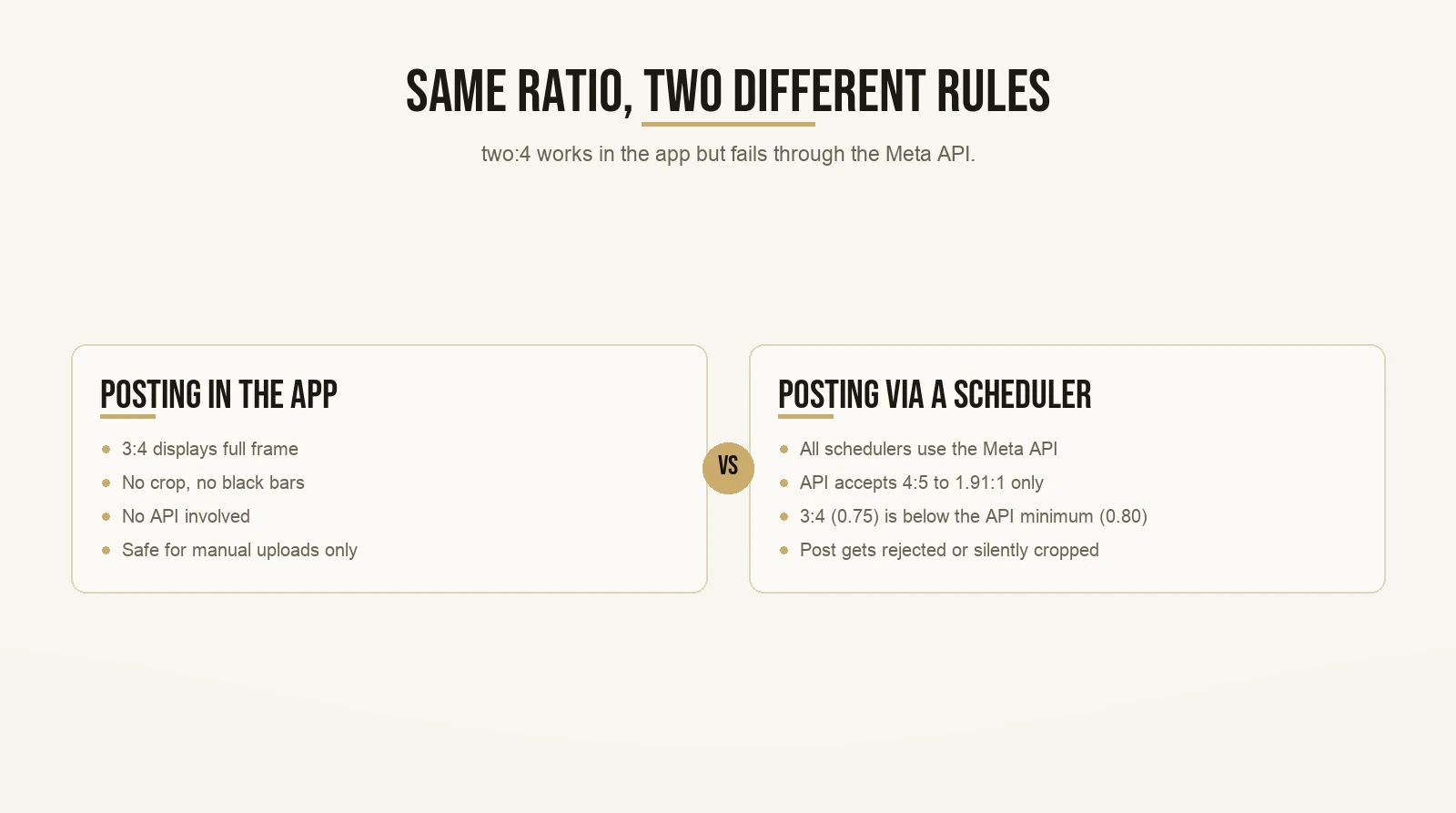
When you post directly from the Instagram app, 3:4 works perfectly. It shows up full frame, no crop, no bars. When you use a scheduling tool, it does not work. The post either gets rejected outright or gets silently cropped before it goes live.
The reason is the Meta API. Every scheduling tool – Buffer, Later, Publer, all of them – posts on your behalf through the Meta Content Publishing API. The API has its own spec, and that spec has not been updated to match the in-app changes. The Meta API carousel spec only accepts carousel images within a 4:5 to 1.91:1 aspect ratio range. The 3:4 ratio is 0.75. The API minimum is 4:5, which is 0.80. A 3:4 carousel sent through the API falls outside the accepted range.
“But Max, the article I read said 3:4 carousels work on Instagram now.”
They do. In the app. Not through the API. Those are two different systems with two different rules, and every spec article on the page one of Google is ignoring the difference.
This is super duper key if you are producing content at any kind of volume. If you are batching posts and scheduling them out a week in advance, your content goes through a scheduling tool. That tool uses the API. A 3:4 carousel in that workflow will not post correctly.
The practical rule is simple: if a scheduler touches it at any point, build at 4:5. Use 3:4 only for posts you are uploading manually, directly in the app. More on when that is actually worth doing in a few sections.
How does the first slide control the whole carousel?
The first slide you upload sets the aspect ratio for the entire carousel. Instagram reads the first image, sizes the carousel container to match, and then auto-crops every subsequent slide to fit that container.
So if your cover slide is 4:5 and your second slide is 1:1, Instagram crops the second slide to 4:5. The left and right sides get cut. If your text or your client’s photo sits near the edge on that second slide, it disappears.
“Max, can I fix the crop after I upload it?”
No. The cropping happens automatically at upload. You do not get to review it first. You do not get a warning. You find out when you scroll through your published post and notice the second slide looks wrong.
The fix is pretty straightforward: lock your canvas size before you design anything. Pick one aspect ratio. Build every single slide to that ratio from the start. In Canva, set the custom dimensions before you put anything on any slide, and apply those same dimensions across the whole set.
4:5 = 1080 × 1350 px. 3:4 = 1080 × 1440 px. Pick one. Apply it to all.
The Credibility Bank: which carousel size fits your proof posts?

This is where the Instagram carousel size question stops being a spec question and becomes a strategy question.
The credibility bank is a framework for gathering, organizing, and displaying proof. The idea is this: every testimonial, every result, every before-and-after your clients have shared with you is an asset. Most coaches let those assets sit buried in a folder or disappear into old DMs. The credibility bank approach is to collect all of it, organize it by type, and build it into your content system so your audience can find it when they land on your profile.
Proof that no one can see does nothing. Proof that sits at the top of your profile does sales work every hour you are not online.
The strongest place to deploy your credibility bank is a pinned carousel. A new visitor arrives on your profile. The pinned post is the first thing they see. They swipe through your proof. They form a first impression of whether you can actually help them. That is your credibility bank doing its job.
Now here is where the carousel size decision actually matters.
Since January 2025, the Instagram profile grid shows thumbnails at 3:4. A 4:5 carousel gets its grid thumbnail cropped slightly at the top and bottom. Not dramatically, but enough to clip text or faces sitting near the edges of the cover slide.
A 3:4 carousel fills the grid tile with zero crop. The image shows exactly as you designed it.
For a pinned credibility bank carousel, build it at 3:4 and post it manually from the app. You pin it once, and you leave it. The API limitation does not apply to a one-time manual upload. Your scheduling workflow never touches it. For everything else in your regular rotation, 4:5 is still the right call.
Here is how coaches are actually using this on their profiles – the pattern is consistent: proof displayed prominently at the top of the feed, visible to every new visitor before they scroll once.
Contrarian Ideology: why most creators should not switch to 3:4 everywhere

Every article covering the 3:4 update frames it as an obvious upgrade. Taller is better. Your phone already shoots 3:4 natively. Why would you not switch everything over?
Hold on.
Contrarian ideology is a framework for finding the position that the crowd is getting wrong. You look at the popular consensus, you identify the assumption holding it up, and you ask whether that assumption is true for your situation. Sometimes it is. Sometimes the popular advice is built for a creator profile that does not match yours.
The advice to switch everything to 3:4 is built on the assumption that you post manually, one piece of content at a time, directly from your phone. For that creator, it is fine advice.
But if you are serious about your content, you are batching. You are filming 5, 10, 20 pieces in a single session. You are scripting in batches, editing in batches, scheduling in batches. You are not posting each piece the moment you finish it. That workflow is what makes consistent posting sustainable. You cannot post every day if you start from scratch on every piece.
“But Max, everyone is saying 3:4 is the new standard now.”
Everyone who is posting one piece every few days from their phone. That is not the workflow that builds a consistent presence over months.
Here is the chain: posting at volume requires batching. Batching requires scheduling ahead. Scheduling uses a third-party tool. That tool uses the Meta API. The Meta API only accepts 4:5 carousels. A 3:4 carousel in that chain gets rejected or cropped, and if you do not check your scheduling queue closely, you might not notice until you are already behind on your calendar.
The contrarian position is not that 3:4 is a bad format. It is a taller format and it fills more screen. The contrarian position is that for most creators building a real content system, switching to 3:4 everywhere right now introduces a workflow problem that is not worth the marginal gain. Stay on 4:5 until the Meta API catches up. When it does, this advice changes. Until then, 4:5 is the format that works end to end without friction.
What about square and landscape carousels?
Square (1:1, 1080 × 1080 px) works in the app and through the API. It is safe. But it gives up vertical feed space. Portrait content fills more of the screen because your audience is holding their phone vertically. Square posts show visible background on both sides of the frame. There is almost no content reason to choose square over 4:5 portrait for a coaching carousel.
Landscape (1.91:1, 1080 × 566 px) also works. It is the format for content that is genuinely horizontal: a wide before-and-after comparison, a data visualization that needs horizontal room, a panoramic image. For most carousels a coach would build (teaching slides, proof posts, a lead magnet walkthrough), landscape is the wrong shape. Your audience is scrolling vertically. Portrait content fills that orientation.
Portrait wins almost every time. Square is acceptable but gives up real estate. Landscape has specific use cases, and that is about it.
How many slides should your Instagram carousel have?
Instagram raised the in-app carousel limit to 20 slides in August 2024. Before that, the limit was 10. If you post through a scheduling tool using the Meta API, the limit is still 10. The 20-slide option is only available in-app.
“Max, should I use all 20 slides?”
Holy moly, no. Not unless every slide earns its place.
More slides is not a signal to the algorithm. It is a signal to the reader. A 20-slide carousel that keeps someone swiping because each slide adds something real will outperform a 20-slide carousel where they stop at slide seven because it went flat.
A 6-slide teaching post where every slide moves the reader forward does more work than 18 slides with padding. For credibility bank carousels specifically, three strong testimonials will do more than ten mediocre ones every single time. Proof quality beats proof volume.
If the content genuinely needs 15 slides, use 15. Make sure each one is there for the reader.
What size should your cover slide be?
The cover slide has two jobs. Every other slide has one.
Interior slides only appear in the feed while a viewer is actively swiping. The cover slide appears in the feed AND as the profile grid thumbnail. It is the only slide that faces both surfaces at the same time.
That means you design it with two contexts in mind. In the feed: a hook that stops the scroll, clear text, enough information that a new viewer understands immediately what this carousel is about. On the grid: a thumbnail that still reads clearly at smaller scale alongside eight other thumbnails.
For a 4:5 carousel, the grid thumbnail crops the top and bottom slightly. Keep your hook text and main visual centered. Stay away from the very top and bottom edges of the frame.
For a 3:4 carousel posted from the app, the grid thumbnail is the full image with no crop. The design shows exactly as intended. That is the advantage for pinned posts.
Your cover slide is also where your hook lives. The hook decides whether someone taps or scrolls past. It is the most important element of the entire carousel. The Instagram profile template guide for bios, highlights, and pinned posts covers how the pinned post and the grid thumbnail work together as part of your full profile setup.
Does Instagram carousel size affect your reach?
No. Instagram does not push a specific aspect ratio over another. The algorithm does not reward 4:5 over 3:4 or penalize square over portrait.
What the algorithm responds to is engagement: saves, shares, swipe-through rate, watch time. A carousel that gets swiped all the way through tells Instagram that people found it worth finishing. A cover slide that stops the scroll gets the swipe started. Neither of those outcomes is about pixel dimensions.
Where size affects performance is indirectly. A cover slide with text that disappears because of an unexpected crop looks unpolished to the viewer. A grid thumbnail that cuts the hook in half loses potential followers before they tap. These are not algorithm failures. They are design failures that prevent real people from engaging.
Get the sizing right so the design can do its job. Then focus on what actually moves the needle: a strong topic, a hook your audience cannot ignore, content worth saving. That is what growing on Instagram organically actually comes down to, and none of it depends on your canvas dimensions.
Before your next carousel: a quick checklist
This takes under a minute to run through before you open your design tool.
- Set your canvas before you design. 1080 × 1350 for 4:5. 1080 × 1440 for 3:4 in-app-only posts.
- Build every slide to the same ratio. The first slide sets the container. Mismatched slides get cropped.
- If a scheduler touches this post at any point, use 4:5. No exceptions until the API updates.
- Design the cover slide for both the feed and the grid. Keep key elements away from top and bottom edges.
- For a pinned proof carousel, consider 3:4. Post it manually from the app. It fills the grid tile with zero crop.
- Keep slide count meaningful. Depth earns saves. Padding does not.
Pre-built Instagram carousel templates are already set to the correct dimensions, which means you do not have to reset the canvas every time you start a new design.
The bottom line on Instagram carousel size
Pick a format. Understand the constraint. Build everything to the same ratio. That is the whole thing.
4:5 at 1080 × 1350 is the right default for most creators right now. It works in the app. It works through schedulers. It works for the batch-and-schedule workflow that makes consistent posting possible without burning out.
3:4 at 1080 × 1440 has one strong use case today: a pinned credibility bank carousel you are posting manually from the app. It fills the grid tile with zero crop. For that specific post, it is worth building at 3:4.
Everything else in your rotation goes out at 4:5. Not because 3:4 is a worse format. The constraint is that the Meta API does not support it yet, and your scheduling workflow runs through the API. When that changes, the calculus changes. Until then, 4:5 is the format that works end to end without friction.
Get the spec right. Then put your energy into what actually builds the account: content your ideal audience cannot scroll past, and proof they can see the moment they land on your profile. Those two things are what move the needle.
Want the templates behind content that actually gets watched? Grab the templates here and start with the first one today.