
Key Takeaways
- Every swipe on a carousel counts as a separate engagement event, which is why carousels get more reach than single photos
- Slide 1 locks the aspect ratio for every slide that follows – design it at 4:5 portrait first, then build the rest
- The CCN hook framework tells you what slide 1 must do: create a curiosity gap, signal context, and filter for your exact niche
- The CIA structure gives your body slides a sequence instead of just filling space
- Educational and checklist carousels get saved; decorative carousels get likes
- Slide 2 functions as a second hook because Instagram re-serves carousels starting from where a viewer stopped
- The final slide is a save prompt, not a logo placement – most creators waste it
What Is an Instagram Carousel Template?
An instagram carousel template is the slide-by-slide logic that tells you which type of content belongs in which position. A hook slide here. A problem slide there. Teaching slides in the middle. A save prompt at the end.
That is not what comes up when you search for it. Every page ranking for “instagram carousel template” right now is a design asset site. Canva. Adobe Stock. Envato. They hand you a pretty blank to download. They do not give you a single word about why slide 2 functions as a second hook, how the algorithm counts swipes, or what the final slide should say to convert a view into a save.
The design is not the template. The structure is.
Get the structure right and you can execute it on plain white slides with black text and outperform a beautifully designed carousel that has no logic behind it. I have seen this play out repeatedly. Pretty carousels with no framework get likes. Structured carousels that teach something specific get saved, shared, and re-served.
This post gives you the slot-by-slot layout that makes the second outcome repeatable.
Why Does Instagram Push Carousels Further Than Single Photos?
Because each swipe is a separate engagement event, and more engagement signals more value to the algorithm.
Adam Mosseri confirmed this in October 2024: “Multiple pieces of media are going to mean more interactions with your carousel posts. More interactions is going to mean more reach on average.”
He also confirmed something most creators have not built their templates around yet. If someone sees your carousel and does not swipe, Instagram will often re-serve that post to the same person. And when it re-serves it, the carousel can start from the slide where they stopped.
That changes how you think about every slide in the sequence, not just slide 1.
Instagram’s advertising audience reached 1.74 billion users globally in January 2025, with the US market alone at 172 million. Organic carousel reach runs on the same infrastructure. A carousel that generates multiple swipes per viewer competes for that reach the same way a Reel does.
What Makes Slide 1 the Most Important Slide in Your Carousel?
Slide 1 is the hook and the aspect ratio anchor for the entire post. Get both right before you do anything else.
Instagram sets the crop for every slide in the carousel based on slide 1. If you design slide 1 at 4:5 portrait (1080 x 1350 pixels), every slide that follows gets cropped to match. Get this wrong and your carefully designed slides are all misaligned on the viewer’s screen. Design slide 1 first, lock the dimensions, then build the rest.
The visual setup is the easy part. The hard part is the hook.
The CCN Hook Framework
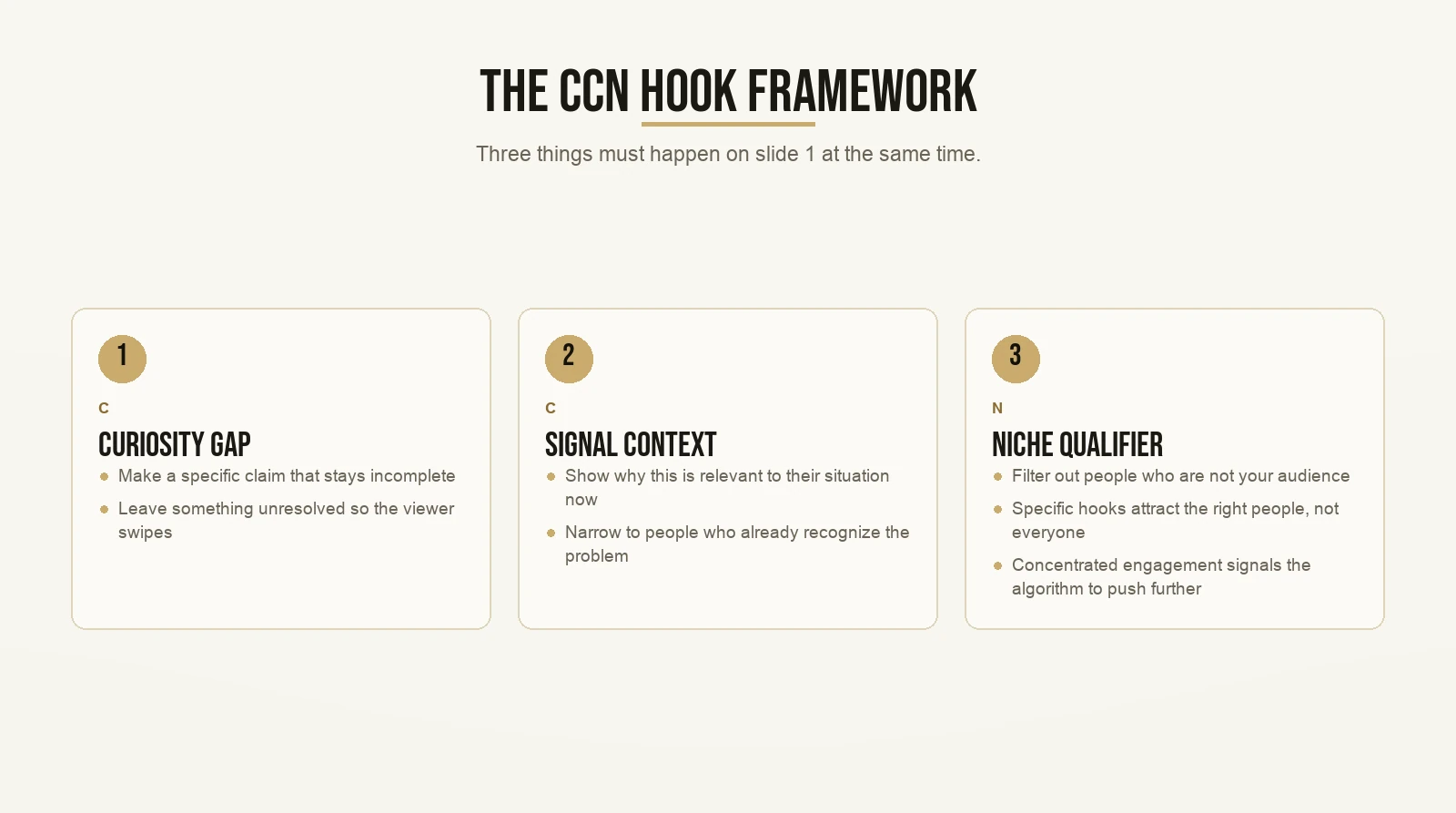
Max calls this the CCN hook framework. It is the mechanism that determines whether the right person stops scrolling or keeps going. Three things have to happen on slide 1 at the same time.
First: create a curiosity gap. Make a specific claim that is incomplete on its own. “The reason your carousels get likes but no saves” works better than “how to get saves on Instagram.” The first version leaves something unresolved. The viewer has to swipe to close the gap.
Second: signal context. Tell the viewer why this is relevant to their situation right now. A business owner who already posts regularly sees “carousel saves” and knows immediately this content is for them. A total beginner might not know enough to care yet. Context narrows your audience on purpose. That is not a loss. That is targeting.
Third: apply the niche qualifier. This is what most people skip. CCN says your hook should filter out people who are not your audience, not just attract the ones who are. A vague hook gets clicks from everyone. A specific hook gets clicks from the right people, who then comment, save, and share it with others in the same niche. The algorithm sees that concentrated engagement and pushes the post further.
“Hold on. A specific hook sounds like it would reach fewer people.”
It does, in the first wave. A hook that says “How coaches can get 50 saves on a single carousel” gets fewer clicks than “How to go viral on Instagram.” But the people who click the specific one are coaches. They are your audience. They engage harder, stick longer, and the algorithm rewards that density. Specific hooks win on net.
On slide 1, the CCN framework runs in a single headline and a supporting image. It is a writing problem before it is a design problem.
How Do You Structure the Body Slides?
The body slides deliver what slide 1 promised. Each one needs a clear job. If a slide does not move the viewer forward, cut it.
The CIA Structure
Max uses the CIA structure to sequence the teaching inside any piece of content. On a carousel, it gives each body slide a role in the sequence instead of just filling space. Run through all three stages and the carousel feels personal. Skip one and it feels flat.
The first stage establishes the gap. Before you teach anything, the viewer needs to feel the problem. One slide, one pain point, stated plainly. “Most carousels look great but never get saved.” If you skip this stage and jump straight to tips, the tips feel generic. They feel like they could be for anyone. When you frame the problem first, the tips that follow feel like they were written for exactly the person reading them.
The second stage delivers the instruction. One idea per slide. One tactic per slide. If you are teaching a five-step process, that is five slides. Keep the text tight: one sentence or a short numbered list per slide. People swipe carousels fast and a wall of text on slide 4 kills completion.
The third stage bridges to action. Before the final slide, you tell the viewer what to do with what they just learned. Try this tonight. Apply this to your next post. Save this for reference. The CIA structure makes sure you are not just dumping information. You are moving the viewer toward a concrete next step.
Most carousels skip the first stage entirely and start at stage two. That is why they feel like a generic list anyone could have written. Run all three stages and your carousel earns the save.
What Goes on the Final Slide?
A save prompt. Not a logo. Not a blank. Not “follow for more.”
Mosseri’s October 2024 announcement confirmed that Instagram re-serves carousels starting from wherever the viewer stopped. If a viewer got to slide 7 of 9 before closing the app, the next time Instagram shows them that post it may start at slide 7. If slide 7 is your logo, the re-serve is a logo. If slide 7 says “save this before you try it,” the re-serve is a conversion opportunity.
Write a final slide that does one of three things: state the single most important takeaway in one sentence, give a direct save prompt (“bookmark this now, you’ll want it later”), or point to what the viewer reads next.
All three outperform a logo or a blank. Pick one and commit.
What Types of Carousels Actually Get Saved?
Saves come from one thing: the viewer wants to return to this later.
That means educational content wins over decorative content. Every time. A gradient-background quote carousel looks great in a grid. But there is no reason to save it because there is no reason to come back to it. A five-step checklist for something you are about to try is something you bookmark.
Here are the four formats that consistently generate saves:
The step-by-step process carousel. One process, one step per slide, clear sequence. The viewer saves it to use as a reference when they go to do the thing.
The credibility bank carousel. Max teaches this as a specific format: all your social proof laid out on sequential slides. Testimonials, results, written responses, direct messages. Pinned to the top of your feed. Viewers swipe through it to decide whether to follow or reach out. See how coaches apply this format to build trust before any conversation starts.
The mistake carousel. “Five things you are probably doing wrong with your carousels.” People save these to check themselves later. The format works because it creates a slightly uncomfortable question the viewer wants to answer privately.
The resource list carousel. Tools, examples, accounts, or links, presented as a curated list. People save it because they cannot click everything at once.
Each of these works because it has a reason to be revisited. Build save intent into the concept before you design a single slide.
Does Adding Music to a Carousel Change How It Gets Distributed?
Yes, and most creators do not know this yet.
Mosseri confirmed in the same October 2024 post that carousels with music added are now eligible to appear in the Reels tab. Carousels without music stay in the main feed only. Adding music opens a second distribution surface at zero extra production cost.
You add the music inside the Instagram app after you upload the slides. Pick a track that fits the mood of the content without competing with it. Keep the volume low. You are not making a music video. You are unlocking Reels tab eligibility for content you already made.
One note: the energy of the track should match the energy of the content. A high-tempo background track under a step-by-step checklist feels jarring and will hurt completion. Match the mood, keep the volume down, and move on.
How Many Slides Should You Actually Use?
Exactly as many as the topic needs. Not one more.
Instagram raised the slide limit to 20 in August 2024. That does not mean you should use 20. Most carousels with strong save rates run between 5 and 10 slides. Viewers swipe carousels fast. If slide 4 is filler, you lose them by slide 5.
A practical way to test your slide count: write the carousel as a numbered list first. If you can cover the content in 5 bullet points, that is 5 teaching slides. Add a hook slide, a problem slide, and a save prompt slide. That is 8 total. If the topic genuinely needs 10 teaching points, use 10.
Let the content dictate the count. Never pad to hit a target number.
How Do You Build a Reusable Instagram Carousel Template?
A reusable template is a slot layout. It is a set of labeled positions you fill for each new post. Once the slots are defined, you spend your energy on the content itself, not on re-deciding the structure every single time.
Here is a slot layout for a standard educational carousel. This is the one I teach and the one that applies CCN and CIA in the correct positions:
- Slot 1 – Hook slide: Apply the CCN hook framework. One headline that creates a curiosity gap, signals context, and filters for your niche. The image supports the headline. High contrast. Big text.
- Slot 2 – Problem slide: One sentence. Name the gap the viewer already feels but has not articulated out loud.
- Slots 3 to 6 – Teaching slides: CIA structure. Start with context (why this matters), move through the instruction (one idea per slide), bridge to action in the final teaching slide before the save prompt.
- Slot 7 – Save prompt: One direct sentence. “Save this before you try it.” “Bookmark this for your next posting session.” “Come back to this when you plan your next week of content.”
That is the core template. Stretch the teaching slots for longer topics. Compress to 5 total slides for simple ones. The slot logic stays the same.
If you want to see how this same structure translates to video format, the Instagram Reel template breakdown covers the equivalent logic for short-form video.
How Do You Know If Your Template Is Working?
Instagram now shows per-slide performance data inside Insights. You can see which slide drives the most likes, where viewers drop off, and how far through the carousel most people actually swipe.
This is super duper key because it turns the template into a diagnostic tool. When you use the same slot structure every time, you can identify problems by slot instead of by post. You are not guessing whether it was the design or the content. You are checking which slot failed.
If most viewers drop off at slide 3, either slide 3 is weak or slides 4 onward do not signal enough value. Check your CIA structure at the drop point. Did you frame the problem but lose the viewer before the instruction started? Tighten the transition.
If slide 1 has strong impressions but very few swipes, the hook is not landing. Go back to CCN. Is the curiosity gap specific enough? Is the niche qualifier doing its job or is the headline too broad to filter for anyone?
A complete guide to reading your Instagram analytics will help you set up this feedback loop and know what to look at after every post.
A Worked Example: The 7-Slide Educational Carousel
Here is the slot layout applied to a real topic. The topic: how to write an Instagram bio that makes the right people follow you.
Slide 1 (Hook – CCN): “Your Instagram bio is losing you followers in under three seconds.” One headline. Plain background. High contrast. 4:5 portrait.
Slide 2 (Problem): “Most bios describe what you do. They don’t say why anyone should care. That’s the gap.”
Slide 3 (Teaching – context stage): Instagram searches the profile name field, not just the bio text. If your ideal client searches “guitar coach for beginners,” your keywords need to be in your name, not buried in a sentence below.
Slide 4 (Teaching – instruction): Use four lines. Line 1 is what you do. Line 2 is who it is for. Line 3 is one proof point. Line 4 is a call to action.
Slide 5 (Teaching – instruction): Show a weak bio example next to a strong one, side by side on one slide. The contrast does the teaching better than any explanation.
Slide 6 (Teaching – action bridge): “Rewrite your bio using this format tonight. Check your profile visits in seven days.”
Slide 7 (Save prompt): “Save this before you update your bio.”
Seven slides. Clear sequence. Every slide has a job. No filler. The CIA structure runs through slides 3 to 6. The CCN hook runs on slide 1. Boom. That is the template in action.
This works in CapCut, Canva, or straight in the Instagram app. The design tool does not matter. The slot structure does.
Carousels and Reels Are Not in Competition
“Should I just be making Reels instead of carousels?”
Both. They serve different jobs.
Reels reach new audiences because the algorithm distributes them to non-followers by default. Carousels convert and retain your existing audience because they reward the kind of deep engagement (multiple swipes, saves, shares) that followers are more likely to give. Running both means you have a reach channel and a conversion channel running at the same time.
If you want help navigating how to find and use templates inside the Instagram app itself, that process pairs directly with the slot layout above.
The creators who grow the fastest run carousels for depth and Reels for reach. Not one or the other. Both.
Build the Template Once, Use It Every Time
The mistake most creators make is treating every carousel as a fresh creative problem. They spend an hour deciding how many slides to use, what order to put the tips in, and whether to include a cover image. Every. Single. Time.
When you have the slot layout, that decision is already made. You fill the slots. You adjust the teaching content for the topic. You post.
Consistency is what compounds on Instagram. The creators who stay consistent without burning out share one trait: they removed the structural decisions that do not matter and kept their energy for the content that does. A slot layout is how you do that for carousels specifically.
You get the gist. CCN on slide 1. CIA in the body. Save prompt at the end. That is the instagram carousel template, and it works every time you apply it correctly.
Want the templates behind content that actually gets watched? Grab the templates here and start with the first one today.