
Key Takeaways
- You can add up to 20 photos or videos in one carousel post. Many guides still say 10. That limit doubled in 2024.
- The first slide is your hook. The second slide is your second chance. Instagram will sometimes show slide 2 to viewers who scrolled past slide 1 without engaging.
- Adding music to a carousel makes it eligible to appear in the Reels tab, which reaches people who do not follow you.
- Per-slide captions launched June 18, 2026. You can now write a separate caption for each slide when creating a new post.
- Instagram’s algorithm rewards saves and shares more than likes. Build slides that are worth bookmarking.
What Is an Instagram Carousel Post?
A carousel is a single Instagram feed post that holds between 2 and 20 photos or videos. Viewers see the first slide in their home feed and swipe left to see the rest.
Instagram introduced carousels for photo dumps, step-by-step tutorials, before-and-after sequences, and anything else that needs more than one frame. Coaches and business owners use them as mini-presentations that walk through a concept or process without sending anyone to a link in bio.
The format has gotten significantly more powerful over the past two years. The slide limit doubled. Music unlocked a new distribution channel. And an algorithm tweak made slide 2 almost as important as slide 1.
If you just want the how-to steps, they are right below. If you want to understand why certain choices inside those steps change how many people actually see your post, stay with me through the whole thing.
How Do You Post Multiple Photos on Instagram?
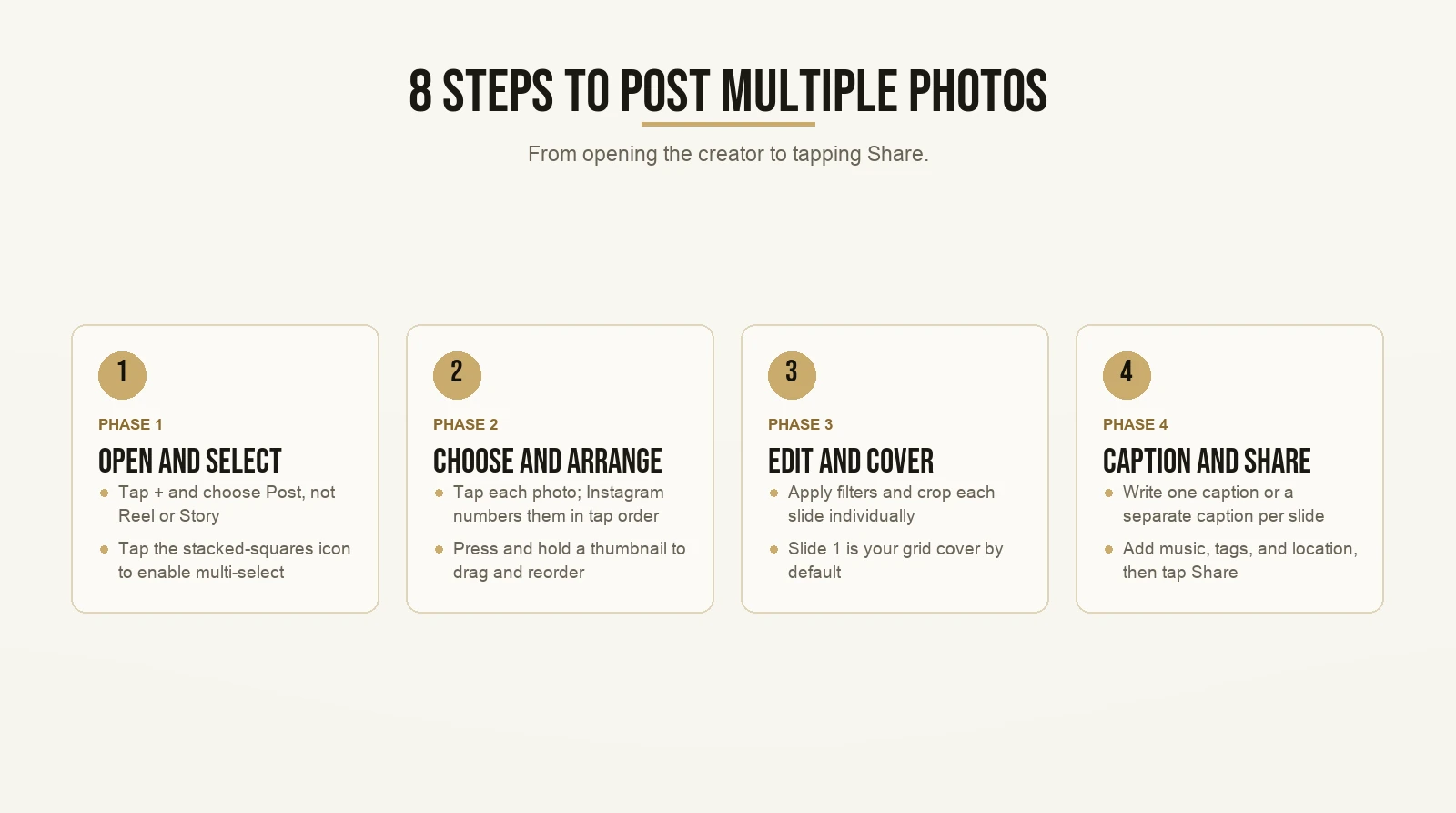
Short answer: tap +, choose Post, switch to multi-select using the stacked-squares icon, select up to 20 photos or videos, arrange them, write your caption, and tap Share.
Here are the full steps.
Step 1: Open the post creator.
Tap + at the bottom of the screen, or at the top right of your profile. Select Post. Not Reel. Not Story. Post.
Step 2: Switch to multi-select.
By default, Instagram opens in single-photo mode. In the lower right corner of the photo selector, look for an icon that looks like two overlapping squares. Tap it. You are now in multi-select mode.
Step 3: Choose your photos or videos.
Tap each item you want to include. Instagram numbers them in the order you tap. That number is your slide order. Tap any item again to remove it.
Step 4: Arrange the order.
After tapping Next, small thumbnail previews appear at the bottom of the editing screen. Press and hold a thumbnail, then drag it to reorder. This is where you decide what goes in slide 1 and what goes in slide 2. Both of those decisions carry more weight than most people realize. More on that in a moment.
Step 5: Edit each slide.
Instagram lets you apply filters and crop each slide individually. For video clips, you can trim here. Make sure text is readable on a small screen before moving forward.
Step 6: Pick a cover.
The cover is what appears in your grid. By default, Instagram uses slide 1. You can drag the crop within the cover selector, but you cannot swap in a different slide as the cover. If a specific image needs to be your grid thumbnail, that image goes in slide 1.
Step 7: Write your caption.
If you are creating a post after June 18, 2026, you will see a toggle in the caption field. The default is Single caption. Flip to Multiple captions and a separate text field appears for each slide. More on this feature below.
Step 8: Add music, tags, and location.
Tap Add Music to attach a song. This is a distribution decision as much as a creative one, and I’ll explain exactly what it changes. Then add any relevant tags or location, and tap Share.
Pretty straightforward. But the choices inside those steps, which image goes first, whether you add music, how you write the captions, those decide how far the post travels.
How Many Photos Can You Add to a Single Instagram Post?
The current limit is 20 photos or videos, not 10. Photos and videos share the same allowance, so a post with 12 photos and 8 videos uses all 20 slots just the same as 20 photos.
According to Instagram’s own help center, this is the current cap. A lot of how-to guides still say 10. That number changed in 2024, and the guides that haven’t caught up will get you in trouble the moment you try to select an eleventh photo and it works.
For coaches who teach multi-step frameworks, this is a meaningful change. A fifteen-step process no longer has to get cut in half or split across two posts. A full before-and-after sequence can live in one place. The extra slides let you actually finish the thought.
The general principle still applies though: every slide has to earn the next swipe. Filling all 20 slots because you can is not the same as filling 20 slots because you have 20 things worth saying.
Why Does Slide 2 Matter as Much as Slide 1?
Most creators spend almost all of their effort on slide 1 and almost none on slide 2. That is a mistake. A specific algorithm mechanic means slide 2 gets its own independent chance to stop someone’s scroll.
In October 2024, Adam Mosseri, the head of Instagram, explained something that most coaches and creators have not adjusted for yet. In his own words: “If someone sees your carousel post but they don’t swipe, we’ll often give that carousel a second chance and automatically move to that second piece of media for the viewer.”
Read that again.
Instagram will take a viewer who scrolled past your post without engaging and, on a later pass through their feed, show them slide 2 as if it were the opening frame. Slide 2 gets its own shot at grabbing attention.
This is where contrarian ideology applies directly.
What is contrarian ideology?
Contrarian ideology is one of Max’s core frameworks. The mechanism is simple. You look at what everyone in your space is doing, find the place where conventional wisdom stops too early or points in the wrong direction, and flip it.
For Instagram carousels, the standard advice is: nail your cover image. Make slide 1 irresistible. That advice is not wrong. But it treats slide 1 as the only place where hook energy matters. The Mosseri second-chance mechanic shows that is not the complete picture.
The contrarian position: treat slide 2 with the same intentionality you give slide 1.
In practice, that means slide 2 is not just the first content point after the cover. It needs to work as a standalone hook for someone who never saw slide 1. A bold claim, an unexpected question, a visually striking image, any of those can work. What does not work is a slide that only makes sense in context of slide 1.
This one adjustment separates carousels that keep circulating for a week from carousels that plateau inside 24 hours. The second-chance reshowing adds a second round of potential engagement, but only if slide 2 can carry its own weight.
The Credibility Bank: Why Carousels Build Trust Faster Than Most Formats

Every piece of genuinely useful content you publish makes a deposit into what Max calls the credibility bank. Carousels are one of the most efficient formats for making those deposits.
The credibility bank is not complicated. When someone reads your carousel and walks away knowing something they did not know before, they remember who taught them. That memory is a deposit. Enough deposits and they trust you. Enough trust and they want to hire you, refer you, or keep paying attention when you post.
The credibility bank is not about volume. Posting every day with thin, forgettable content does not build trust. It just adds noise.
Carousels are freaking powerful for the credibility bank because of what they ask a reader to do. A single image takes half a second to consume. A short video gets watched once. A carousel asks someone to swipe through six, eight, twelve slides. Every swipe is a small commitment. Every additional slide they read is time invested. Time invested creates ownership, and ownership deepens the trust deposit.
Hold up. Does that mean I should make every carousel as long as possible?
No. Each slide has to earn the next swipe. A twelve-slide carousel where every slide delivers something new and specific is a large deposit. A twelve-slide carousel where slides 6 through 12 repeat what you already said is a withdrawal. The reader feels like they wasted their time.
A high-deposit carousel looks like this:
- Slide 1: a hook that earns the first swipe.
- Slides 2 through the second-to-last: one useful, specific point per slide. No filler, no padding, nothing that could be cut without losing information.
- Last slide: a clear direction. “Save this for later.” “Try step 3 this week.” Something the reader can act on immediately.
For coaches who are getting clients through referrals but not through social, this matters directly. It is usually not that the offer is weak. It is that the people who could refer new clients have never seen the coach teach. A carousel that walks through your core method, one step per slide, gives someone something to forward. That forwarded carousel is a referral without a phone call.
You can see how coaches have made this shift when you look at what the transition from referral-only to social looks like in practice. The carousels that drive that shift are almost always teaching carousels, not promotional ones.
If you want a head start on the format itself, carousel templates built to get saved take the guesswork out of structure and layout.
Does Adding Music to a Carousel Change Your Reach?
Yes. Adding music to a carousel makes it eligible to appear in the Reels tab, which distributes content to people who do not follow you at all, beyond what the home feed alone can do.
In October 2024, Instagram’s official creators account confirmed it: adding music to a carousel or photo post makes that post eligible to be shown in the Reels tab.
The Reels tab is discovery mode. People browsing there are not your followers. They are looking at content the algorithm thinks they will like. A carousel without music lives only in the home feed. It reaches your current followers and anyone connected to them through shares. A carousel with music can travel into the Reels tab and reach people who have never heard of you.
But Max, does that mean I should throw any random song on every carousel I make?
Not exactly. Music that fights with your content distracts the reader from the slides. For a teaching carousel where someone is reading text, pick something low-key and instrumental. Match the tone. Do not compete with it.
The strategic decision is simply the act of tapping Add Music. That one step changes which distribution channels your post is eligible for. Skip it and the Reels tab is off the table entirely.
How Do Per-Slide Captions Work?
As of June 18, 2026, you can write a unique caption for each slide in a new carousel post. As a viewer swipes through the post, the caption at the bottom of the screen updates to match the current slide.
When you create a carousel and reach the caption screen, you will see a toggle. The default is Single caption. Switch to Multiple captions and a separate text field appears for each slide.
A few things to know:
- Per-slide captions are only available when creating new posts. You cannot go back and add them to a carousel you have already published.
- You do not need to write a caption for every slide. If you leave a slide’s field blank, the global caption appears there instead.
- The global caption field still handles the overall post description, hashtags, and tagging.
For coaches who use carousels to walk through a framework, this is a useful change. You can write a brief explanation directly under each step instead of cramming everything into one long global caption that most viewers stop reading after the second line. Each slide becomes its own self-contained unit: the visual above, the explanation below.
One note: this feature was reported by tech media at the June 18 launch. No standalone official Instagram blog post has been published on it at the time of writing. The toggle should be visible on your account when you create a new post.
Why Can’t I Post Multiple Photos on Instagram?
If the multi-select option is missing or not working, you are almost certainly in the wrong format, using an outdated app version, or you tapped a photo before enabling multi-select. All three are easy to fix.
Here is what to check.
You are in the wrong format. When you tap +, Instagram gives you Post, Story, Reel, and Live. Multi-photo upload only works inside Post. If you are in the Reel or Story creator, there is no multi-select option. Go back and choose Post.
Your app needs an update. Older versions of Instagram can hide or break the multi-select icon. Open your App Store or Google Play Store, search for Instagram, and install any available update.
You selected a photo before switching to multi-select. If you tap a photo before enabling multi-select, Instagram jumps into the single-photo editor. Go back to the main photo selector and tap the stacked-squares icon first.
A temporary account restriction. Accounts that have received a policy flag can lose access to some features temporarily. This is uncommon but does happen.
If none of those fix it, log out and back in. If that does not work, uninstall and reinstall the app. That clears most cache-related bugs that affect how the selector renders.
What Are the Right Dimensions for Carousel Images?
The standard carousel size is 1080 x 1080 pixels for square or 1080 x 1350 pixels for portrait. The aspect ratio is locked by your first image and applies to every slide in the post.
Portrait carousels take up more vertical space in the feed, which makes them harder to scroll past. If you have only ever posted square carousels, portrait is worth testing.
If you are building your slides in Canva or a similar tool, you can set the canvas to exactly those pixel dimensions before you start. The post on Instagram carousel dimensions has the full spec sheet for every crop format so you do not have to track them down separately.
How Often Should You Post Carousels?
A good starting baseline: one teaching carousel per week, with two or three shorter Reels or single-image posts around it, and stories on most days. Consistency matters more than volume.
A carousel takes more time to make than a quick Reel or a single image. That production cost matters when you are also running a coaching business. You need a rhythm you can sustain, not a pace that burns you out in month two.
But Max, if carousels take that long, can I just post one a month and call it good?
You can. But one carousel a month is not a content strategy. It’s an experiment. Consistency matters because the algorithm learns what your content does and who responds to it. It learns faster with more samples. Weekly is a floor worth aiming for.
The post on how often to post on Instagram goes into the full thinking on posting frequency for coaches who are also running a business, not just a content channel.
What I have seen consistently: coaches who genuinely enjoy the process of teaching on camera improve faster and build audiences that actually engage. The ones who treat it like a chore to crank through plateau and stop. The quality bar for a carousel is not production value. It is: does this slide deliver one thing that is worth knowing?
What Does the Algorithm Actually Do With Carousel Posts?

Instagram’s feed ranking weighs saves and shares heavily because they signal that content was worth bookmarking or forwarding. A carousel that earns both gets pushed out long after its initial distribution window closes.
Instagram’s feed ranking weighs how quickly a post collects shares, saves, comments, and likes, along with how likely a specific viewer is to engage based on their history with similar content.
Carousels tend to score well on the two signals that drive the widest distribution.
Saves happen when someone thinks the content is worth coming back to. A teaching carousel with a specific, usable framework gets saved. A motivational quote rarely does.
Shares happen when someone wants to send the post to a specific person, or add it to their own story. Every share is distribution that costs you nothing, going to people who have never seen your profile.
If you want to understand how all of this connects to the full set of decisions the algorithm makes, the post on how the Instagram algorithm really works covers the complete picture, including what happens after the initial push and why some posts keep growing days later.
One thing worth internalizing: the algorithm is not trying to decide if your post is good. It is trying to predict whether a specific person will engage with it. The more precisely you build for a specific reader, not a broad general audience, the better those predictions go in your favor. A carousel aimed at business coaches who want more clients will outperform a carousel aimed at everyone who uses Instagram, even if the broader post is technically more polished.
That precision is what creates compounding reach over time. Not the most slides, not the best filters. The most relevant content for the right person at the right moment.
Want the templates behind content that actually gets watched? Grab the templates here and start with the first one today.