
Key Takeaways
- Instagram Stories has two completely different things both called templates: gallery layouts and Add Yours interactive prompts. They work differently and serve different goals.
- The Add Yours sticker turns your Story into a chain. When others respond, their Story credits you as the originator. That is free organic reach with no algorithm required.
- Custom Add Yours Templates (launched December 2023) let you pin design elements so your branding stays intact when others use your template.
- After a Reel goes viral, new visitors tap your profile and look for an active Story. If nothing is there, most of them leave. Templates make it easy to always be present.
- Consistently posting Stories makes deposits into your credibility bank. That consistency is what turns casual viewers into people who buy.
What does “how to use templates on Instagram story” even mean?
Most searches for how to use templates on Instagram story are looking for two completely different things, and almost every article out there mashes them together.
Type 1 – Gallery Templates: Pre-built layouts you pick from the camera toolbar. You fill them with your photo or video. Fast, polished, no design required.
Type 2 – Add Yours Templates: Interactive prompts that build a chain. Someone sees your Story, taps the sticker, and adds their own take. Their response links back to your original. Their followers can discover your prompt through the chain.
Read that again. Their followers see your original prompt.
These two tools work differently. They serve different goals. This post covers both. It also covers the one thing almost no article explains: why Story templates matter strategically when you’re building a business on Instagram.
How do you use the gallery Templates button on Instagram Stories?
Open the Story camera, then look for the Templates button in the toolbar above your photo gallery. Tap it and browse three categories: Trending Prompts, Trending Templates, and International Hits. Select any layout, drop in your media, and post. Takes under two minutes.
Step by step:
- Open Instagram and tap the camera icon in the top left corner.
- Swipe right at the bottom of the screen until you’re in Story mode.
- Look at the toolbar directly above your photo gallery.
- Tap the button labeled Templates.
- Browse the three categories: Trending Prompts, Trending Templates, and International Hits.
- Tap any layout that fits what you want to say.
- Add your photo or video into the template frame.
- Tap Share.
Instagram confirms these three categories in their official Stories Tips guide. The gallery template path is a design shortcut. It is great for speed. But it is not a reach tool. For reach, you want the Add Yours sticker, which is next.
How do you use the Add Yours sticker on Instagram Stories?
Open the Story camera, shoot a photo or video, tap the sticker icon, search for “Add Yours,” type your prompt, and post. Anyone who sees your Story can tap the sticker and respond with their own Story, which links back to yours and credits you as the originator.
Step by step:
- Open the Story camera and shoot your photo or video.
- Tap the sticker icon – the square face icon at the top of the screen.
- Type “Add Yours” in the search bar.
- Select the Add Yours sticker from the results.
- Type your prompt in the text box. For example: “What are you working on right now?” or “Show me your workspace.”
- Drag the sticker to wherever you want it on the screen.
- Tap Share.
When someone responds, Instagram creates a public chain. Each response links to your original. People browsing the chain who have never heard of you can see your prompt and your handle. That is reach with no algorithm involved.
Instagram’s own sticker help documentation explains this chain mechanic.
How do you create your own custom Add Yours template with pinned elements?
While editing your Story, long-press any element – text, GIF, or image – and select “Pin” from the menu that appears. Add the Add Yours sticker. Post. Anyone who uses your template can add content but cannot remove or reposition your pinned elements. You are credited in every response.
This feature launched in December 2023. Instagram head Adam Mosseri announced it via his IG Updates Broadcast Channel with these exact words: “You’ll be able to develop and share your own custom, meme-able templates by pinning GIFs, text, and gallery images – and template creators will be credited when others participate in the trend.”
Instagram’s complete Stories guide documents this December 2023 launch.
Here is what this means practically. You build a template once: your visual style, your prompt, your branding. When someone uses it, your pinned elements stay exactly as you placed them. Their Story shows up in front of their audience with your visual identity intact. You did not have to do anything extra. The template traveled for you.
That is not just a fun feature. It is a brand distribution mechanism.
What should your Add Yours prompt actually say?
This is where most creators waste the feature.
Hold up. Can’t I just use any prompt that gets a lot of responses?
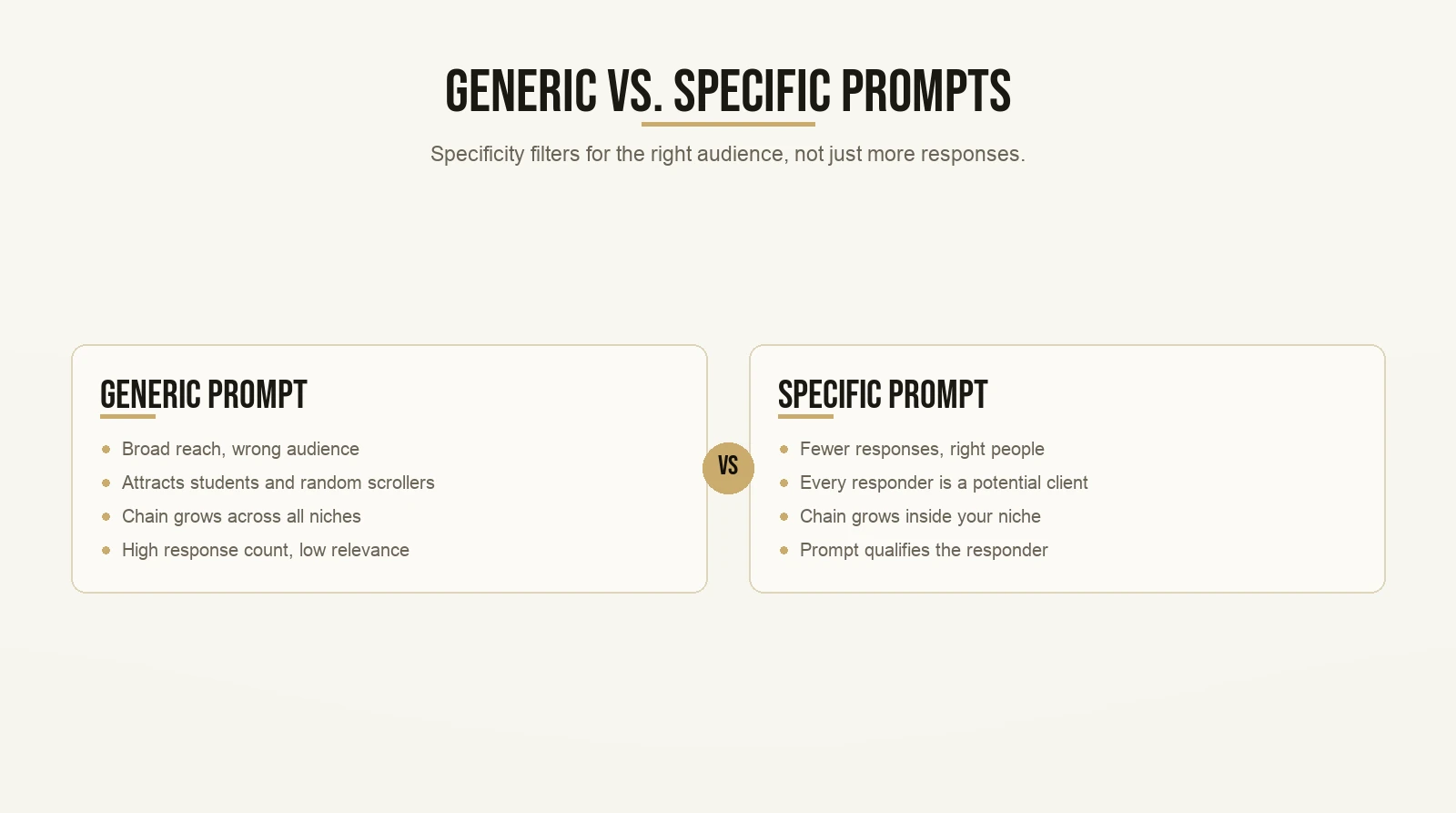
Sure. But generic prompts – “Show me your morning view,” “What are you eating today” – get responses from everyone: students, random scrollers, people who will never be your client. You get a chain with hundreds of participants who have nothing to do with your niche.
Here is the better move. Make your prompt specific to the problem your audience is dealing with.
If you’re a business coach, “What’s your biggest obstacle to getting a new client this month?” gets fewer responses. But every person who responds is a potential client. Every person who discovers your prompt through the chain is the right kind of person.
The chain grows in your niche instead of everywhere.
Specificity is the filter. A prompt that qualifies the responder is worth ten generic prompts. Before you post any Add Yours sticker, ask yourself: would the person this prompt attracts ever buy what I sell?
For worked examples of prompts that bring in the right audience, the post on Instagram story templates for coaches has a full breakdown with niche-specific options.
Why do Stories matter most right after a Reel goes viral?
Here is something almost nobody teaches.
Say your Reel picks up traction. New people see it. Some of them tap your profile. What are they looking for?
They want to know if you’re active. If you have something to say today. If you’re a real person who shows up consistently or someone who posted one video and then disappeared.
The first thing they check is whether you have a Story.
If there is nothing there, most of them bounce. They scroll back to their feed. You just lost a warm visitor – someone who chose to come to your profile because your content made them curious enough to look.
Templates fix this. They give you something to post even on the days when you have nothing prepared. A gallery template with a photo from earlier in the week. A quick Add Yours prompt on a niche question. Five minutes and you are present.
This is the strategic case for Story templates that every competitor article misses. It is not about looking good. It is about being there when a warm visitor shows up.
What is the credibility bank and how do Stories build it?

The credibility bank is a framework for thinking about the relationship between your free content and your paid offers.
Every time you show up and give genuine value – a useful tip, an honest answer, a behind-the-scenes moment – you make a deposit. You build trust with people who see your content. When you eventually ask them to take action, you are making a withdrawal. The more deposits you have made, the more likely the withdrawal goes through.
The problem most creators have is they go quiet for two weeks, then post something promotional. That is like walking into a bank where you have no account and asking for a withdrawal. It doesn’t work.
Stories are one of the fastest ways to make consistent deposits. They are low-pressure. They don’t need to be polished. An Add Yours prompt asking what your audience is struggling with this week is a deposit. A behind-the-scenes photo with a question attached is a deposit. A poll on your niche topic is a deposit.
Instagram’s overview of Stories features shows how many interaction tools you have: polls, question boxes, countdowns, Add Yours stickers, and more. Each one is an invitation to engage. Engagement is a deposit.
The creators who convert well from Stories are not the ones with the best designs. They are the ones who show up every day and make their audience feel seen. Templates make daily showing up sustainable.
What are the newer sticker features worth knowing about?
Instagram has added several stickers since 2023 that most guides do not cover yet.
Reveal sticker: Your Story content is blurred until a follower sends you a DM to unlock it. This is a lead capture tool built into the Story format. Tease something valuable and use the DM as the door.
Cutout sticker: Turn any photo or video from your camera roll into a custom reusable sticker. Build stickers from your own face, your product, or any image you want. It creates recognizable visual identity without a design app.
Add Yours Music: A version of the Add Yours sticker built for song sharing. You post a song. Others share theirs. The chain grows around music, which tends to drive high engagement and discovery.
Link sticker: No longer requires 10,000 followers. Any account can now add an external link to a Story. If you use Stories to drive traffic to a booking page, a lead magnet, or any other resource, you can do that from day one.
Instagram officially announced all four of these additions. If you are working from a guide that still says you need 10k followers to add links, it is out of date.
What is the contrarian ideology around Instagram Stories?

The conventional wisdom is this: Stories are a warm audience tool. Reels are for discovery. Stories are for nurturing the followers you already have. Keep them separate.
That framing is mostly right. But it misses something important.
Contrarian ideology, as a framework, is about finding the place where conventional wisdom is incomplete – and staking a clear, specific position on what is actually true. Here is the contrarian read on Stories:
Add Yours templates are a discovery tool, not just a nurturing tool.
When someone responds to your Add Yours prompt, Instagram links their response to your original Story in a public, browsable chain. People scrolling through that chain – people who have never heard of you – can land on your original. If you built a custom template with pinned elements, they see your visual identity and your handle.
Instagram’s full Stories guide confirms that Add Yours creates a public, browsable thread. Your original sits at the top. Anyone can find it.
So the contrarian position is this: treat Add Yours not just as a way to engage existing followers, but as a second distribution channel. Build prompts that qualify the right audience. Let the chain do the reach work.
This does not replace Reels as your primary discovery engine. But it adds a lane that most creators leave completely empty.
What are the most common mistakes with Story templates?
Let’s go through them quickly.
Using prompts with no connection to your niche. A template about sunsets or coffee gets engagement from everyone and from nobody useful. Every prompt you post should attract the person who would benefit from what you sell.
Building a custom template once and never promoting it. You need to drive participation. Point your existing audience to your Story and tell them to use the template. Give them a clear reason to join the chain.
Ignoring the Link sticker. If you have a free resource, a booking page, or a lead magnet, the Link sticker is the shortest path from a Story to that action. There is no follower count threshold anymore. Use it.
Treating Stories as Reel reruns. Stories and Reels do different jobs. A Story is a conversation. A Reel is a broadcast. Reposting your Reels directly into Stories and calling it done is not a Stories strategy.
Going quiet after a Reel picks up. When your Reel drives new visitors to your profile, if there is no active Story, you are losing warm visitors in real time. Post something. An Add Yours prompt. A quick text Story. Just be present.
Quick guide: which Story template type to use when
Use gallery templates when:
- You want a polished Story quickly with no design work
- You have a photo or video but do not want to start from scratch
- You are matching a trending visual format to stay current
Use the Add Yours sticker when:
- You want your audience to participate and respond
- You want to build a chain that reaches beyond your followers
- You are running a prompt or challenge around your niche topic
Use custom Add Yours templates when:
- You want your branding locked into a shareable format
- You want a recurring template your audience recognizes over time
- You are building something specific enough to qualify the right participants
Use the Reveal sticker when:
- You want to capture DM conversations as a starting point
- You have exclusive or teaser content worth hiding behind a prompt
Use the Link sticker when:
- You want to drive direct traffic from a Story to any external page
- You have a booking link, opt-in, or free resource to share
If you want help on the discovery side – finding which templates are already working in your niche – how to find templates on Instagram walks through that process in detail.
What if I’m not a designer? Can I still make this work?
Hold up. I can’t design anything that looks good enough for people to want to share.
Here is what I’ve seen consistently: design is not what drives Add Yours participation. Relevance is.
A plain text Story that asks “What is the hardest part of getting your first client this month?” with an Add Yours sticker will outperform a beautifully designed Story with nothing interesting to engage with. Every single time.
People respond to the idea. They respond to whether the question feels like it was written specifically for them. Your niche and your point of view are the design. Get those right and the visual quality matters far less than you think.
If you want to see how other creators have built this into a consistent content system, you can read their experiences and get a sense of what the pattern looks like in practice.
And if you want pre-built visual starting points instead of designing from scratch, the post on how to use templates on Instagram without looking generic covers how to adapt existing templates so they feel original instead of copy-paste.
What comes next after you understand the tools?
You now know how both template types work. The gallery path for speed. The Add Yours chain for reach. The pin mechanic for protecting your branding. The strategic case for staying active in Stories when a Reel starts picking up.
Pick one thing and test it this week. Not all of them. One.
If you have a Reel performing well right now, post an Add Yours Story that continues the conversation from that Reel. Ask the follow-up question your Reel raised. See who responds and what the chain looks like after 48 hours.
If your Reels are not yet reaching new people, the post on how to go viral on Instagram Reels covers the framework for that side of the equation first.
The tools are there. Instagram built a genuine discovery mechanic into Stories. Most people use it for engagement and leave it at that. You can use it for reach.
Want the templates behind content that actually gets watched? Grab the templates here and start with the first one today.