
Key Takeaways
- Every published “best days” chart shows averages from accounts that are not yours. Your own data is more accurate.
- Instagram runs four separate algorithms: Feed, Reels, Explore, and Stories. Posting time is a listed signal for Feed. It is not a listed signal for Reels.
- As of August 2025, the Edits app shows your followers’ hour-by-hour activity by day. This replaced the need for any third-party chart.
- Content quality and engagement speed in the first 30 to 60 minutes carry more weight than posting time.
- For Reels, a video that underperforms at first can be reposted 30 days later and often reaches more people the second time.
- Consistency beats optimization. Posting at a decent time reliably beats posting at a perfect time occasionally.
Every article about the best days to post on Instagram hands you a heatmap. Wednesday at 11am. Tuesday between 9 and 11. Thursday at 2pm.
Those charts are not wrong. They just answer a different question than the one you actually have.
What Are the “Best Days to Post on Instagram” Charts Actually Showing?
They are showing aggregated engagement data from the paying customers of social media tool companies, averaged across niches, time zones, and account sizes that have nothing to do with yours. These are respectable sample sizes built from the wrong audience.
A relationship coach posting to US-based adults in their 40s and a fitness trainer posting to college students in Australia both end up in the same dataset. Their peak activity windows are completely different. But the chart averages them together and says Wednesday at 11am.
The chart is an average. Averages hide the specific thing you need to know.
There is also a deeper problem with how these charts frame the conversation. They imply that posting time is the main lever for reach. It is not. Once you understand how Instagram actually decides what to show people, you will see why.
Does Posting Time Actually Affect Your Instagram Reach?
Yes, but only for some formats, and less than the charts suggest. Posting time is a signal for Feed ranking but is not listed as a Reels ranking signal at all. Content quality and early engagement velocity matter more than the clock regardless of format.
Instagram has confirmed that its Feed algorithm uses posting time as one input among thousands of signals. The algorithm predicts how likely you are to like, comment, share, or spend time on a post. A recent post from someone you follow has a freshness advantage over an older one, all else equal. So timing has a real effect on Feed.
But the effect is bounded. It does not override content quality or engagement velocity. If your content generates fast engagement after it goes live, the algorithm reads that as a positive signal and shows it to more people. A great post at a suboptimal hour can still outperform a mediocre post at the perfect hour.
For Reels, the distribution window is longer. A Reel can pick up steam over multiple days, not just in the first hour. Timing is far less critical for Reels, and the reposting strategy I cover later in this post is built on exactly that.
How Does Instagram Actually Rank Your Posts?
Instagram does not have one algorithm. It has four: Feed, Reels, Explore, and Stories. Each one uses different signals. Posting time matters for Feed and barely registers for Reels.
According to Instagram’s own ranking explainer, the Feed algorithm’s primary signals are time spent on the post, comments, likes, shares, and profile taps. Posting time affects the recency signal. Recency is one input among many.
For Reels, the algorithm looks at engagement differently. It measures whether people watch through, like it, and send it as a DM. Shares and DM sends are the dominant signals. Timing is not listed.
This matters for how you allocate your energy. If you are primarily posting Reels, the clock is not your biggest variable. The quality of your hook, the relevance of your topic, and whether people want to send the video to someone they know – those are your levers.
Feed posts live and die more in that first-hour window. If you are posting static images or carousels, timing deserves more attention. If you are posting Reels, fix the content structure first.
Why Does Your Own Audience Data Beat Any Published Chart?
Because it shows your specific followers’ actual activity, not an average across millions of unrelated accounts. The Audience section in the Edits app shows when your followers are active by hour and by day of the week. That level of specificity makes every third-party heatmap obsolete for your account.
In August 2025, Instagram added the Audience section to the Edits app. It shows where your followers are located, what they are interested in, and when they are active. As of March 2026, Instagram Insights became available to every public account. You do not need a Professional account or any special status to access this data.
In April 2026, Instagram redesigned the Insights layout into three tabs: Overview, Engagement, and Audience. That same update replaced “view rate” with “skip rate” as a metric. If you are still tracking view rate, your app needs an update. Skip rate tells you how many people scrolled past without watching, which is more useful feedback.
Open the Audience tab. Scroll to “When they’re active.” You will see a grid of hours and days. The darker the cell, the more of your followers are online at that time. That grid is your posting schedule.
Check it once a week. I do mine on Monday mornings and spend about 30 minutes reviewing the previous week. You get the gist. No tool subscription needed.
Before You Post, Run the Viral Video Checklist
Here is what most timing articles skip entirely. Timing cannot save bad content. If you optimize your posting schedule but never fix what you are posting, you are just putting mediocre content in front of people faster.
Before you worry about when to post, run the viral video checklist.
The viral video checklist is a pre-publish quality gate. You run it before every piece of content goes live. It checks whether your video has the structural elements that drive shares, saves, and profile taps – the signals that actually move the needle with the algorithm.
A video fails the checklist if any of these are true:
- The hook does not catch attention in the first two or three seconds
- The topic only interests people who already follow you
- There is no natural reason to share it with someone else
- The video talks about you instead of talking to the viewer about their problem
That last one is super duper key. Content that explains your credentials or your background reaches the people who already follow you. Content that addresses a problem the viewer is already living with right now reaches people who have never heard of you.
Videos that only interest your existing core audience stall between 100 and 900 views. Not because the algorithm is broken. Because the algorithm correctly identifies that the video has limited broader appeal and does not push it further.
Run the checklist first. A video that fails it will not be rescued by a well-timed post. Timing is step three. Content quality is step one.
For coaches building out their Reel content strategy, the Instagram Reel ideas for coaches guide breaks down what strong content looks like in practice.
What Is CCN and Why Does It Come Before Your Posting Schedule?
CCN is the framework that determines who your content actually reaches. It gives you a diagnostic lens you apply before scheduling, because if you get CCN wrong, timing shifts will not help.
Most creators think about content in binary terms: it went viral or it did not. CCN gives you a cleaner way to see what is happening.
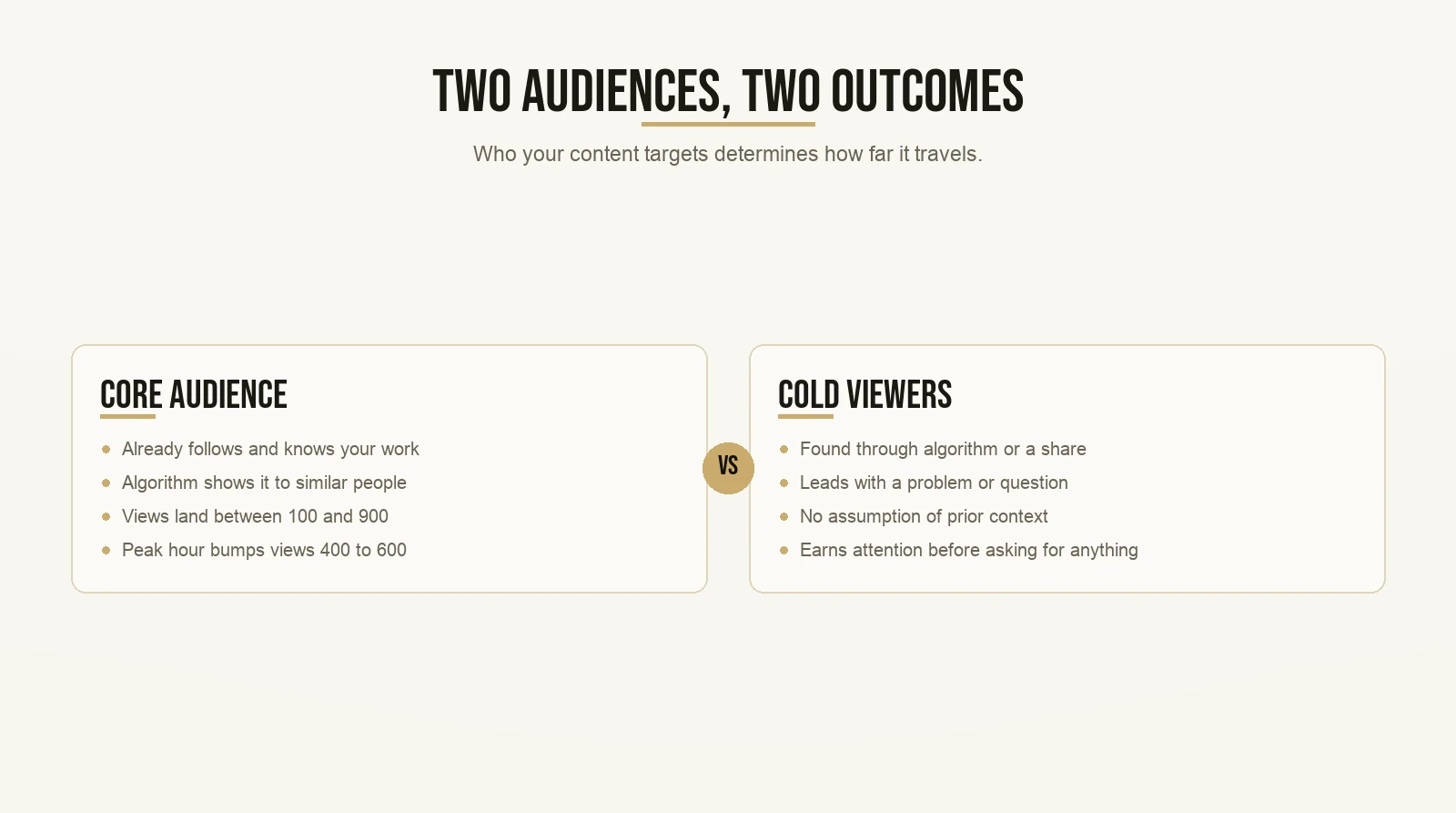
Every piece of content you post is aimed at one of two groups. The first is your core audience: people who already follow you, already know your work, and already care about what you teach. The second is cold viewers: people who have never heard of you, found your content through the algorithm or a share, and are encountering you for the first time.
Content aimed at your core audience behaves predictably. Your followers see it, some engage, the algorithm shows it to a few more people like them, and it stops growing. Views land between 100 and 900.
Content aimed at cold viewers works differently. It leads with a problem or question that someone with zero context about you would still care about. It does not assume the viewer knows your background or your offer. It earns attention in the first few seconds before asking for anything.
That is the CCN lens. Before you schedule anything, apply it. Ask: who is this video actually structured for? Would a complete stranger find value in the first ten seconds, or does it only land for people who already follow me?
If the answer is existing followers only, posting at peak hour bumps your views from 400 to 600. It will not break the video out. The CCN problem has to be solved in the content itself, not in the calendar.
This is why content structure comes before scheduling. If you want to build out the full system from content targeting through to finding clients, the organic Instagram growth guide covers how the pieces connect.
How Do You Find Your Actual Best Time to Post on Instagram?
Open the Edits app or Instagram Insights, go to the Audience tab, find “When they’re active,” identify your top two or three windows, and schedule your posts there. Check it once a week as your audience grows. This takes ten minutes and is more accurate than any published chart.
Here is the step-by-step:
Step 1. Open the Edits app on your phone. Tap Insights at the bottom right. If you do not have the Edits app, open Instagram, go to your Professional Dashboard, and tap Insights. Both show the same data.
Step 2. Tap the Audience tab. This is one of three tabs since the April 2026 redesign.
Step 3. Scroll to “When they’re active.” You will see a grid of days and hours. Darker cells mean more of your followers are online at that time.
Step 4. Identify your top two or three windows. Write them down or screenshot the grid.
Step 5. For the next four weeks, post during those windows. Each Monday, spend 30 minutes reviewing the previous week. Look at views, shares, saves, and skip rate.
Step 6. Every three months, go back to the Audience tab and recheck. As your account grows, your audience composition shifts. Active hours shift with it.
Pretty straightforward. The reason most creators skip this step is they did not know the Audience section existed. Now you do.
For a deeper look at building a full growth system around your posting habits, the Instagram growth strategy guide covers the broader approach.
What If You Have an International Audience?
If your followers are spread across multiple time zones, you cannot hit peak hour for every group. Post during the window with the best overlap between your two largest audience segments, and accept the imperfect coverage everywhere else.
The Audience tab in the Edits app shows your followers by country and city. If your biggest segments are US and Europe, post late evening in Europe. That lands during mid-afternoon on the US East Coast and early afternoon on the West Coast.
You will not perfectly hit peak time for any one group. But you will be in a reasonable window for both. Aim for the best overlap and move on.
For the specific question of how weekday behavior differs from weekend posting, the guide on the best time to post on Instagram on Monday breaks it down by format.
But Max, What If I Miss My Ideal Posting Window?
Post anyway.
Seriously. Post anyway. A post at a decent time beats no post every single time.
Adam Mosseri has said on his broadcast channel that the optimal posting schedule is the one you can actually sustain. He would rather you post twice a week for two years than post every day for two months and then burn out and stop completely.
Consistency signals to the algorithm that you are an active creator. It builds audience habits too. Your followers start to expect content from you and look for it.
A post at 2pm when your peak window is 7pm will not perform at the same level. But it will not hurt your account either. Post it.
And for Reels specifically, missing the optimal window matters even less. There is a built-in correction for that.
The Content Re-Run Hack for Reels

This is one of my all-time favorite strategies. It is almost embarrassingly simple. It still works. And it directly reduces the pressure to post at exactly the right time.
Here is the mechanism.
Every Reel with potential gets posted three times. You post it normally the first time. Thirty days later, you post it again. Thirty days after that, you post it a third time. If it keeps performing, you continue the 30-day cadence until it stops working.
Why does this work? Within 30 days, you have gained new followers who have never seen that video. And even your existing followers did not watch every single video you posted, especially if you post frequently. The second and third postings reach a genuinely new audience every time.
But Max, doesn’t the algorithm flag it as a duplicate?
Fair question. In theory it should. In practice, it does not. The algorithm does not seem to penalize reposting as long as 30 days of fresh content sit between each version and the video continues to perform when it comes back up. As long as it keeps getting engagement, it keeps getting distributed.
The freaking beautiful implication for the timing question: a Reel that went live at a suboptimal hour on day one gets a full second chance on day 31. And a full third chance on day 61. Timing mistakes on Reels are not permanent.
Some videos perform significantly better on their second posting than their first. Completely new viewers, reset distribution window, same video. There is no good reason not to run this on every Reel that passes the viral video checklist.
Post at your best window. Repost at 30 days. Check metrics each time: views, CTA replies if you have one, and new followers. Keep going as long as it performs.
For coaches in particular – whether you work in relationships, fitness, nutrition, parenting, or anything else – this system means a well-made video never gets permanently buried by one bad posting window.
What Are the Best Days to Post on Instagram? (The Real Answer)
There is no universal best day. Any chart naming Wednesday or Tuesday is showing you someone else’s audience.
The real answer comes from four things:
Your own Insights. The Audience tab in the Edits app shows your specific followers’ active hours by day. Check it weekly. This is the only data source that actually knows your audience.
Your content format. Feed posts are more sensitive to timing than Reels. If you primarily post Reels, focus on content quality and shares first. Timing is a secondary variable.
Your time zone situation. If your audience spans multiple zones, aim for the window with the best coverage. If it is concentrated in one region, match their peak hours.
Consistency over optimization. Instagram has said explicitly that reach is never certain, even when you do everything right. The algorithm weighs thousands of signals. A reliable posting cadence matters more than finding the one perfect hour.
Here is the order of operations that actually moves the needle:
- Pass the viral video checklist before every post
- Apply the CCN lens: is this structured to reach new viewers or just existing followers?
- Check the Audience tab and post during your peak window
- For Reels: repost every 30 days as long as it performs
Timing is step three out of four. It matters. It is just not where most accounts have a real problem.
The creators and coaches I have seen grow fastest fix steps one and two first. Then they use the Edits app to handle step three and run the repost system to handle the rest. If you want to see what that approach looks like in practice, the team behind this content has been teaching this system for years at Instant Viral Templates.
Want the templates behind content that actually gets watched? Grab the templates here and start with the first one today.