
Key Takeaways
- The name field, not the handle, is what Instagram’s search indexes. Put your keywords there.
- Your profile photo does one job in one second: make a stranger decide you are worth following. Face forward, clear light, no sunglasses.
- Your bio has four lines. Each one has a specific job.
- Highlights are a visual proof bank. Four folders covering proof, teaching, client results, and how to work with you.
- Your pinned posts and grid tell a stranger whether you run a real operation or post when you feel like it.
- As of August 2025, your Reposts tab is a new credibility surface. Be intentional about what you repost.
What Does It Mean to Position Yourself as an Expert on Instagram?
Positioning is not your bio tagline. It is the sum of every signal a stranger reads before they decide whether to follow you. Think of it as the impression your profile makes before a visitor processes a single sentence.
Most creators treat their Instagram profile like a business card. Write a tagline, pick a photo, call it done. Then they wonder why their Reels get views but their follower count barely moves.
Here is the problem. A stranger who taps through from a Reel does not start with your bio. They see your photo first. Then your name. Then they scan your Highlights and glance at your grid. All of that happens in about three seconds. Then they decide whether to stay or bounce.
That three-second window is where positioning lives. And most creators are losing it without knowing it.
If you want to know how to position yourself as an expert on Instagram, start with what that window actually contains.
Why Does This Actually Matter?
There are 1.74 billion people on Instagram’s advertising platform alone. That is not a niche channel. That is a serious distribution machine, and it is still growing.
Here is the number that makes it relevant for you specifically. 22% of active social media users globally follow influencers or experts on social channels. That is one in five people who log in specifically looking for someone they can trust and learn from. That figure rises even higher among younger audiences.
Those people are already looking for an expert. The question is whether your profile tells them you are one. If it doesn’t, they bounce to the next account. You never know they were there.
How to Position Yourself as an Expert on Instagram: Start With the Name Field
The name field is the most underused positioning tool on the platform. It controls two things at once: whether a stranger can find you in search, and what they read first when they land on your page.
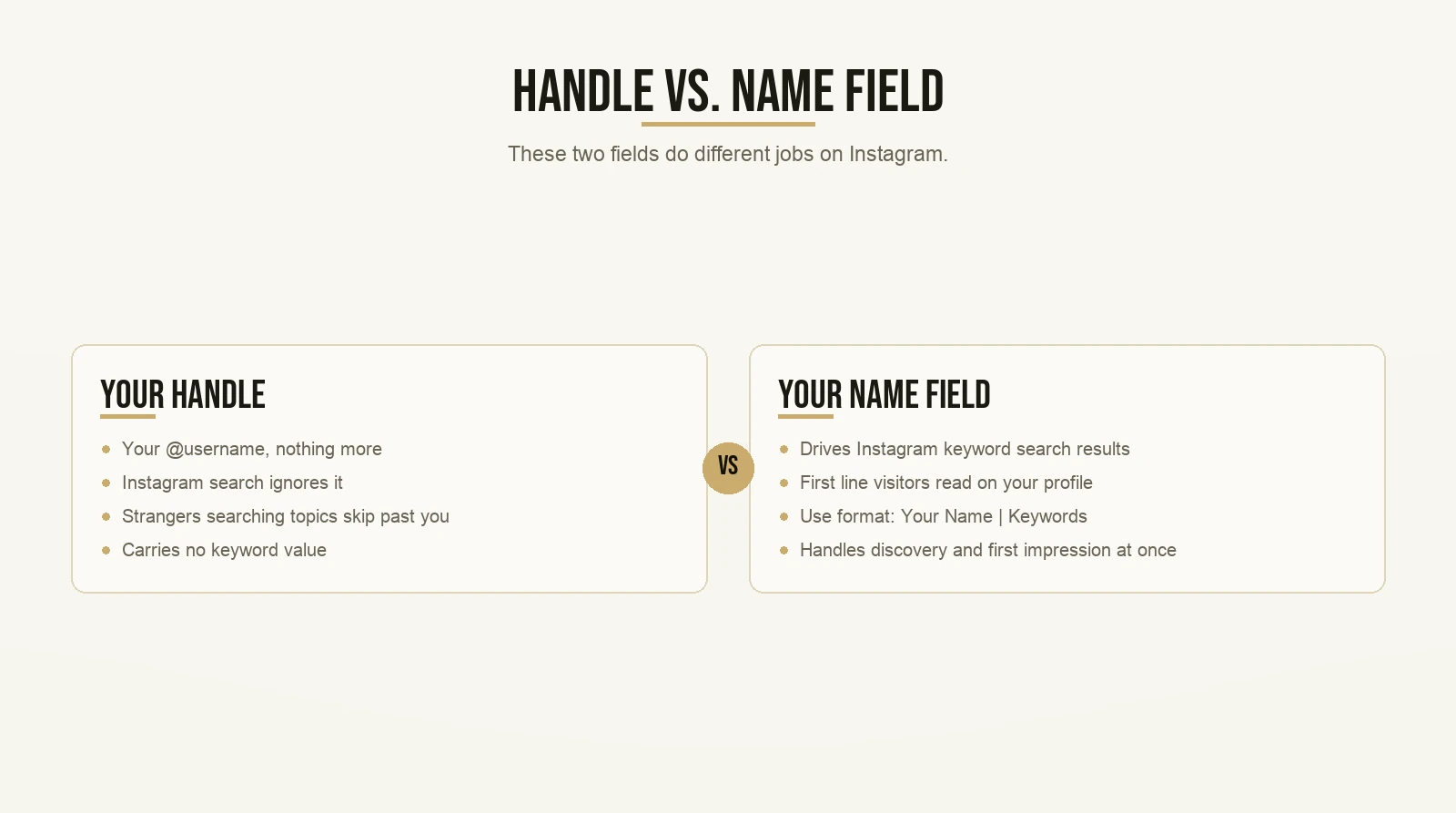
Here is where most creators go wrong. They treat the handle and the name as the same thing. They are not. Your handle is your @username. Your name is the text that appears underneath your profile photo. These two fields do different jobs.
Instagram’s search surfaces accounts based on what is in the name field. The handle does not work the same way. If your name field says “Max Tornow” and nothing else, a stranger searching for “social media coach” will not find you. Simple as that.
I teach this using one of my students as an example. His name is Jim. His handle is literally just Jim Antonellis. Nothing fancy. But his name field says “guitar coach for beginners.” When someone types “guitar coach” into Instagram search, Jim comes up. Not because of his handle. Because of his name field.
Hold on, Max. My name is already taking up all the space in the name field. Where do I fit keywords?
You have more room than you think. The name field is not just for your first and last name. Use the format: Your Name | Your Keywords. Or lead with just the keywords if name recognition isn’t your goal yet. The key question is simple: what would my ideal client type into Instagram search? Put that phrase in the name field.
That is the discoverability side. But here is the second job the name field does that most people never think about.
It is the first line a visitor reads when they land on your profile. Before the bio. Before the Highlights. Right there under your photo. Five words of prime real estate. If it only says your name, a stranger learns nothing about what you do. If it says your name plus your keywords, they know in one second whether you are worth their time.
Two jobs. One field. Use both.
What Should Your Profile Photo Actually Look Like?

Your profile photo does not communicate your personality. It communicates your professionalism in about one second. Three things that work: face forward, clear light, direct eye contact. Three things that don’t: darkness, sunglasses, a logo.
Most creators get this wrong in the same ways. The photo is blurry or dark. They wear sunglasses. Or they use a brand logo instead of their face.
A badly lit selfie taken in a car tells a stranger you threw this together in five minutes. That is not an authority signal. Sunglasses hide your eyes. Eye contact in a photo builds connection; no eye contact creates distance. And a logo works for massive consumer brands that everyone already recognizes. It does not work for coaches and creators who are the product. Your face is your brand. Use your face.
What does work: a clear, well-lit photo of your face. Direct eye contact with the camera. Ideally, your brand colors are somewhere in the image – the background, your clothing, something. That visual consistency starts training a stranger to recognize you before they have learned your name.
Very very key: your profile photo appears tiny in most contexts. In search results, in the Stories bar, tagged on someone else’s post. Test how it looks at thumbnail size. If you cannot see your face clearly when it is small, the photo is not doing its job.
How Do You Write a Bio That Converts a Stranger Into a Follower?
Your bio has four lines. Each one has a specific job. Done right, a stranger moves from “who is this?” to “I should follow them” in under ten seconds.
Line one: who you help and with what result. Not your job title. Not your credentials. Who you help. “I help coaches grow on Instagram without paid ads” beats “Digital Marketing Expert” every time. Specificity is the authority signal.
Line two: what makes you credible, stated as a mechanism. Not a money figure. Not a follower count. How long have you been doing this? What specific framework have you built or taught? “Taught 800+ creators the exact system I use” is specific, it is credible, and it does not need a dollar figure to land.
Line three: a specific proof point that is not a dollar figure. The number of students in your community, the number of countries they come from, the number of posts you have helped improve. Specific numbers beat vague claims every time.
Line four: your call to action and link. Tell them exactly what to tap and what they will get. “Grab the free templates below” with your link is cleaner and more effective than a clever closing line with no direction.
But wait, Max. What if I’m just starting? I don’t have 800 students.
That is a fair objection. Here is the answer. One is not zero. If you have helped one person get a result, that is a testimonial waiting to happen. If you have not helped anyone yet, lead with the process you teach and why it works. The mechanism is credible even without a long track record. Specificity does the heavy lifting that social proof does later. State what you teach clearly, and a stranger can evaluate whether it is useful. That is enough to earn a follow at the start.
What Are Instagram Highlights and Why Do They Matter for Authority?
Highlights are the most underrated authority tool on the platform. Most creators use them randomly. A few archived Stories, a generic label, done. That is leaving real credibility on the table.
Think of your Highlights bar as a ten-second proof bank. Every cover image should match your brand colors. Every label should answer a question a stranger would have when they land on your profile for the first time.
A stranger who does not know you has four core questions:
- Are you the real deal?
- What do you actually teach?
- Who have you helped?
- How do I work with you?
Four questions. Four Highlights folders.
Name them something close to: “Results,” “What I Teach,” “Client Stories,” and “Work With Me.” Every folder does one job. A stranger can click through all four in under a minute and know exactly whether they want to take the next step with you.
The Results folder is your credibility bank. Process wins, before-and-after metrics, evidence of what applying the frameworks produces. Engagement numbers, reach percentages, follower growth percentages – all of that communicates expertise without needing a dollar figure. You can see how proof is structured effectively across different teaching styles at Max’s student results page.
The What I Teach folder is your free sample. A few slides of the framework in action, a carousel preview, a short clip. Give it away here. Generosity is freaking powerful as an authority signal.
The Client Stories folder is your testimonials in their own words. Real quotes from real people. Specific results. Not vague praise.
The Work With Me folder is your call to action in visual form. A stranger who is already sold should not have to go hunting for the next step. Put it here.
Does Your Grid Communicate Expertise?
Yes, and a stranger reads it in under five seconds. Your grid answers one question before a visitor checks anything else: does this person post consistently?
A consistent grid tells a stranger you run a real operation. A scattered grid – random photos, inconsistent colors, long gaps between posts – tells them you post when you feel like it. You do not want to be the second one.
This is not about having a perfectly coordinated color palette. It is about pattern recognition. Pick two or three content types and repeat them. Pick a color for your graphics and stick with it. Film your talking-head content in the same location or with the same lighting setup. Those consistent choices add up fast.
Super duper key: your pinned posts are the top row of your grid, and you control what goes there. Pin your best-performing posts, your most trust-building posts, or the best example of what you do. Every new visitor sees that top row first. Do not let the algorithm decide what sits there. Decide it yourself.
What Is the Dialogue Format and How Does It Build Authority Fast?
The Dialogue format is one of the most effective ways to demonstrate expertise on screen, because it voices the objection a stranger already has and answers it before they have to ask.
Here is how it works. You play two roles: a “smart” character who knows the answer and a “confused” character who asks the obvious question. The smart version corrects the confused one and explains the right approach. Same person, two takes, edited together.
It works because it is a visual version of the heckle-then-answer move. You put the doubt on screen and resolve it in the same clip. That is useful content. Useful content builds trust. Trust builds followers.
The format you choose also signals your positioning. A solo talking-head video positions you as “just a person with opinions.” A Dialogue, a Whiteboard, or a Bad-Good-Great format positions you as someone who has thought through a system. Those formats take more effort, and a stranger can see that effort. For a full breakdown of which format to use for which type of content, the post on types of Instagram posts and which format to use when covers it completely.
What Changed on Instagram in August 2025?
Instagram added Reposts in August 2025. This changes how a stranger experiences your profile, and most creators have not updated their strategy to account for it. Your profile now has more surfaces than it did a year ago.
When someone visits your profile now, they do not just see Posts, Reels, and Tagged. They also see a Reposts tab. That tab shows everything you have publicly reposted.
This is a new credibility surface. What you repost signals what you endorse. If you repost thoughtful content from credible voices in your niche, a stranger clicking that tab sees a curator who pays attention. If you repost random content with no clear pattern, they see noise.
There is also a distribution upside. When you repost someone else’s content, it can be recommended to their followers even if those followers do not follow you yet. That means reposts now drive profile impressions from people who have never heard of you.
The practical takeaway is pretty straightforward: be intentional about what you repost. It is not just a share anymore. It is a public endorsement that lives on your profile and gets evaluated alongside everything else.
How Does Your Content Build Authority Over Time?
Getting the profile right is the foundation. But the profile alone does not make you an expert. Your content does. And the content has to be specific enough that a stranger thinks: this person actually knows what they are talking about.
Vague content sounds like this: “Post consistently and engage with your audience.” Anyone could write that sentence. A stranger reads it and learns nothing they could not have guessed.
Specific content sounds like this: “Videos that only interest your core audience stall between 100 and 900 views. They don’t fail because the topic is bad. They fail because the topic is only interesting to people who already know you.” That sentence could only have been written by someone who has actually studied what happens at the 900-view ceiling.
The specificity is the authority signal. It does the work that credentials used to do. A stranger can evaluate it in real time. If you say something specific and it clicks for them, you have just demonstrated expertise right in front of them. Boom. That is the moment they follow.
This is what the CCN framework is built around. CCN stands for Core Community Niche. Your content needs to serve your core audience first – the people who already follow you and trust you. But it also needs to reach people who have never heard of you. A video aimed only at your existing audience stalls. A video aimed only at cold audiences doesn’t convert them into followers because there is no reason to follow. The CCN framework finds the overlap: a topic your core audience cares about that is also understandable by someone who has never seen your content before.
If the hook is where you are struggling – because even the right topic doesn’t get watched if the first two seconds don’t pull someone in – the post on Instagram Reel hook ideas that stop the scroll is the next read after this one.
What Is the Full Profile Authority Stack?
Seven elements, each doing a different job. Together they form one coherent authority signal. A stranger who scans them in order can decide whether to follow you in well under a minute.
Here is the full stack:
- Your profile photo. Face, clear, well-lit, no sunglasses.
- Your name field. Your name plus the keywords your ideal client would search for.
- Your bio. Four lines: who you help, what makes you credible, a specific proof point, a call to action.
- Your Highlights bar. Four folders: proof, teaching, client results, how to work with you.
- Your pinned posts. The top row of your grid, set intentionally to your strongest content.
- Your grid. Consistent enough that a stranger sees a real operation.
- Your Reposts tab. Intentional reposts that signal what you endorse.
Each element does a different job. None of them is optional if you want to be taken seriously by someone who found you thirty seconds ago.
Hold on, Max. I have been posting for months and I still don’t have many followers. Is my profile really the problem?
Sometimes yes, sometimes no. There are two separate jobs here: getting found and getting followed. Your name field and your Reels handle getting found. Your photo, bio, Highlights, and grid handle getting followed. If you are getting views but not followers, the profile is almost certainly the bottleneck. Fix it before you change anything about your content strategy. The post on how to improve your Instagram profile walks through a full audit checklist if you want to go element by element.
Positioning Is Not a One-Time Setup

Most creators set up their profile once and forget about it. That is a mistake.
Your positioning evolves as your authority grows. The bio you write when you have 200 followers should look different from the one you write at 5,000. The Highlights you curate when you are just starting look different from the ones you maintain once you have real client results to show.
Here is the rule. Every 90 days, run through the profile authority stack above. Ask yourself: does every element still reflect where I am and who I am helping right now? Update anything that has fallen behind.
Your content and your profile should tell the same story. When they do, a stranger who finds you through a Reel and lands on your profile sees one coherent signal: this person knows what they are doing, they teach it clearly, and they have helped people get real results.
That is the moment they follow.
That is what it means to position yourself as an expert on Instagram. Not a tagline. Not a headshot. The whole stack, aligned, telling one clear story.
Want the templates behind content that actually gets watched? Grab the templates here and start with the first one today.