

Key Takeaways
- The recommended Instagram Story size is 1080 x 1920 pixels at a 9:16 aspect ratio.
- The 15-second Story limit was removed in September 2022. Videos under 60 seconds now play as one continuous clip.
- Meta has never published a pixel-based safe zone for organic Stories. The commonly cited numbers (250 px top, 250-340 px bottom) are community measurements, not official Meta documentation.
- Story ads use a different canvas: 1440 x 2560 pixels. Their safe zones are officially published by Meta as percentages, not pixels.
- Getting the dimensions right is not a design concern. It is a function concern. Your credibility content only earns trust if a viewer can actually read it.
What are the correct Instagram Story dimensions?
The recommended Instagram Story size is 1080 x 1920 pixels at a 9:16 aspect ratio. That fills the full vertical screen on every modern smartphone without cropping or letterboxing.
Meta’s ads documentation lists 250 pixels as the minimum accepted width, but anything below 600 pixels starts to show visible quality loss. For practical purposes, 1080 x 1920 is the number that matters.
For file types and limits:
- Images: JPG or PNG, under 30 MB.
- Video: MP4 or MOV, under 4 GB.
Images display for 5 seconds by default. Videos play up to 60 seconds per card.
Hold up. Do I really need to memorize all these specs?
No. You need to memorize one thing: 9:16. Every editing tool worth using, including CapCut, Canva, and even your phone’s native camera app, has a 9:16 preset. Select it before you start building and the pixel dimensions set themselves. What you do need to pay attention to is where your content sits inside that canvas. That is the safe zone conversation, and it is where most coaches quietly lose credibility every single day without realizing it.
Is the 15-second Story limit still a thing?
No. Instagram removed it in 2022.
In September 2022, Instagram confirmed that videos under 60 seconds would no longer be split into 15-second segments. Meta’s exact statement: “You’ll be able to play and create Stories continuously for up to 60 seconds, instead of being automatically cut into 15-second clips.”
This is a freaking important update to know. A lot of “Instagram Story best practices” content floating around online was written before that change. Any guide that still warns you about the 15-second limit is working from stale information.
You can now record a 45-second teaching clip, post it as a single Story, and your viewer gets the whole thing without tapping forward. That changes how you can structure a credibility-building card, a client testimonial walkthrough, or a short method explanation.
Images still display for 5 seconds by default. That has not changed.
What is the safe zone in Instagram Stories?
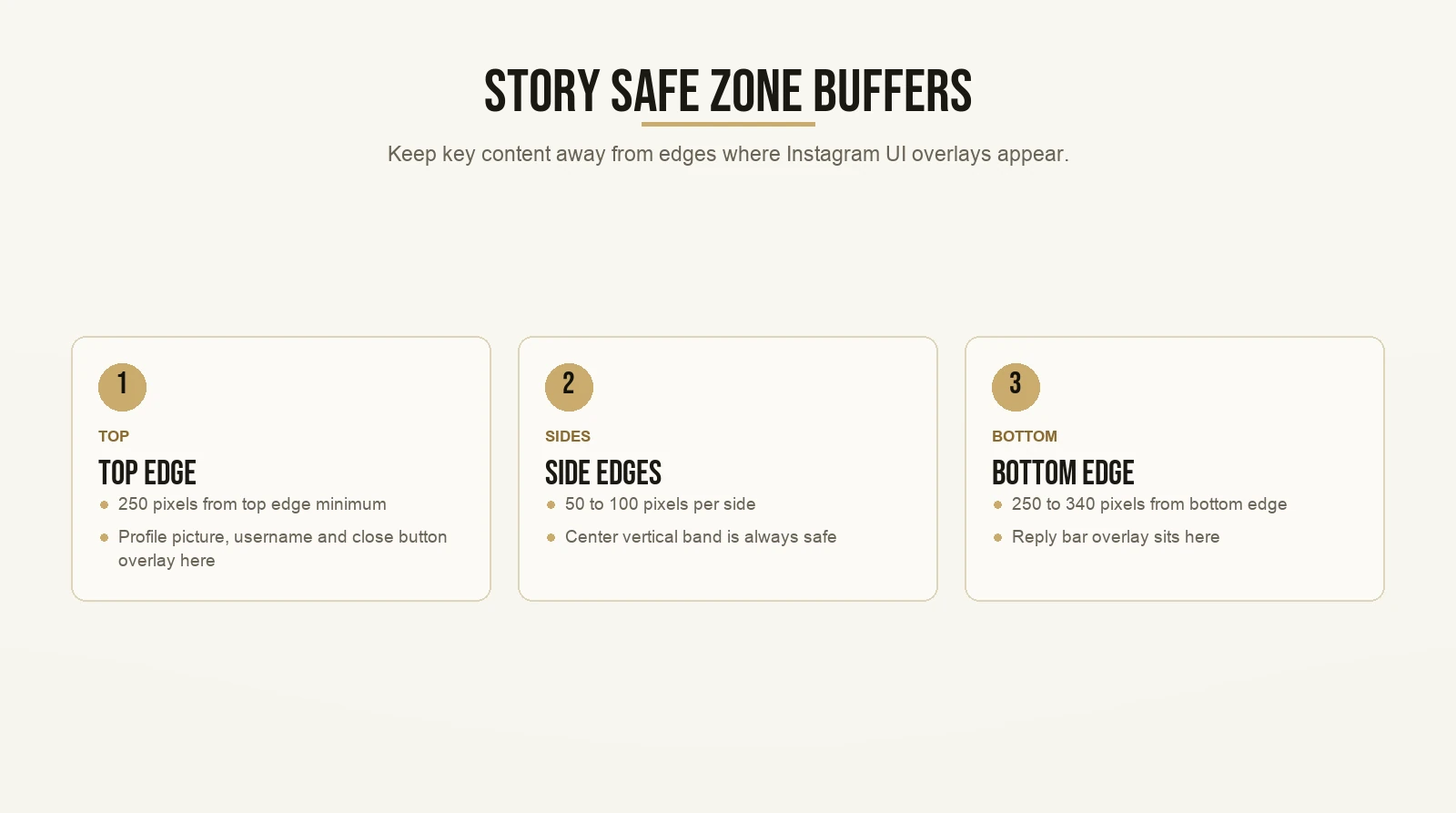
The safe zone is the part of your Story canvas that is not covered by Instagram’s own interface. At the top, Instagram overlays your profile picture, your username, and the close button. At the bottom, it overlays the reply bar. Any text or visual sitting behind those elements is invisible to the viewer.
The widely cited measurements are:
- Top: keep key content at least 250 pixels from the top edge.
- Bottom: keep key content at least 250 to 340 pixels from the bottom edge.
- Sides: a buffer of roughly 50 to 100 pixels per side is standard practice.
Here is the piece of information most guides leave out entirely.
Meta has never published a pixel-based safe zone specification for organic Stories. Those numbers are community measurements. Designers measured where Instagram’s UI elements actually sit on screen across a range of common devices, and those measurements became the unofficial standard. They are good estimates. They are not official Meta documentation. Any article presenting them as the official Meta spec is not sourced to a Meta document.
Hold up. Does that mean I can just ignore them?
Absolutely not. It means you should treat them as guardrails, not certainties. Device sizes vary. Operating system updates sometimes shift UI element placement slightly. The safest rule: keep your most important content in the center vertical band of the canvas. The middle third is always safe. If your text needs to sit near the top or bottom edge, give it more buffer than you think you need.
In practice, design your templates with text and key visuals sitting between 250 pixels from the top and 340 pixels from the bottom. Set that up once in your design tool and you never need to think about it again.
How is the Story ad canvas different from organic?
This is a real distinction that most guides blur, and it matters before you spend any money on Story ads.
For organic Stories, the recommended canvas is 1080 x 1920 pixels. For Story video ads, Meta’s official guidance recommends 1440 x 2560 pixels. These are different canvases. Applying an organic template to a Story ad without adjustment means your safe zone math is wrong.
For Story ads, Meta publishes official safe-zone clearances as percentages:
- 14% from the top, free of text, logos, and key visuals.
- 35% from the bottom, free of text, logos, and key visuals.
- 6% from each side, free of text, logos, and key visuals.
On the recommended 1440 x 2560 ad canvas, those percentages convert to roughly 358 pixels from the top, 896 pixels from the bottom, and 86 pixels per side.
Notice how large that bottom clearance is. 896 pixels is more than a third of the full canvas height. If you design an organic Story template and run it as a paid ad without adjusting, your call to action or key proof point will disappear behind the ad’s “Learn More” button. That is a preventable failure with real cost attached.
For the video technical settings: H.264 compression, square pixels, fixed frame rate, progressive scan, stereo AAC audio at 128 kbps or higher. Files should not contain edit lists or special container boxes.
One more rule for ad video length: clips under 16 seconds play in full. Videos 16 seconds or longer may be automatically split into one, two, or three Story cards. Plan your ad length with that 16-second threshold in mind.
What is the credibility bank, and why does your safe zone matter for it?

Here is where the pixel conversation stops being abstract.
There is a framework called the credibility bank. When a cold viewer, someone who has never heard of you, lands on your Instagram profile, they need to know within about ten seconds whether you are worth following. If your profile answers that question clearly, they follow. If it does not, they scroll back to their feed. You lose them.
The credibility bank is the system you build to answer that question every time, for every cold viewer, automatically.
It has three parts.
Who am I. Your hero story. How you went from having the problem your audience has right now to having the result they want. If you are a relationship coach, this is the story of your own transformation or the journey that led you to this work. It does not need to be dramatic. It needs to be specific.
What I do. Your unique method. Not your offer. Not your pricing. Your mechanism. The contrarian take on how you get results that sets you apart from everyone else in your niche. This is where you state your core beliefs out loud and let the right people self-select.
Client results. Proof that the method works. Screenshots, before-and-afters, testimonials. For an example of what strong client results look like in practice, see what coaches who have used this framework have to say.
These three pieces live in your Instagram Highlight section. You build each one as a Story, post it, and save it as a Highlight. That is the credibility bank. Building it is the first structural task for any coach who wants their Instagram profile to work for them around the clock.
Now here is the connection to Story dimensions, and this is very very key.
Every card in your credibility bank is a Story card. If the text on that card sits below the safe zone floor, it is hidden behind the reply box. The viewer sees the visual but cannot read the proof. The card looks like content. It does not function as credibility.
This is a silent failure. Nothing breaks loudly. You just have a credibility bank that does not do the job it was built to do.
I have seen well-built accounts where the most important line on the client results card sits exactly where Instagram’s reply bar covers it. The transformation statement is there. Nobody reads it. That is a freaking credibility leak, and it is completely preventable.
Open your Highlights right now and check. Look at the bottom quarter of each card. Is your key text visible, or is the reply bar sitting on top of it? If it is, rebuilding those cards with text inside the safe zone is the first thing to fix.
You get the gist. Story dimensions are not an aesthetic preference. They are the structural requirement that determines whether your credibility bank actually does what it was built to do.
For a full walkthrough on building your profile architecture from the ground up, see Instagram profile template: bio, highlights, and pinned posts.
How to set up a Story correctly in CapCut
CapCut is the most practical tool for this workflow. Here is the setup from scratch.
Open CapCut and start a new project. Before you import anything, set the canvas. Tap the ratio selector and choose 9:16. That locks the canvas to 1080 x 1920 automatically. You do not need to enter any numbers manually.
Import your video or photo. If you are working from a horizontal clip, it will not fill the vertical frame. Do not stretch it to fill the canvas. Stretching distorts the image and looks unprofessional. Use the blur background fill option instead. CapCut pads the sides with a blurred version of your clip, giving you a clean vertical format without cropping the subject.
Add text next. Keep it in the middle third of the canvas. Start no higher than 250 pixels from the top edge, and end no lower than 340 pixels from the bottom edge. In CapCut’s visual editor, that is roughly between the 13% mark from the top and the 18% mark from the bottom. Keep text away from both the top and bottom quarters of the canvas and you will always be inside the safe zone.
Export at default settings. CapCut’s standard export produces an MP4 with H.264 compression, square pixels, and a fixed frame rate. That is exactly what Instagram expects. There is no reason to change the video settings unless you have a specific project requirement.
There we go. Post directly from CapCut to your Instagram Story, or save to your camera roll and upload from there. Either path works. Pretty straightforward.
The viral video checklist and where technical quality fits in it
Before posting any piece of content, there is a checklist for evaluating whether it is actually ready to go. Max calls this the viral video checklist, and most of what is on it is about the content itself: is the topic one a cold viewer would care about, is the hook strong enough to stop a scroll, does the video give someone who has never heard of you a reason to follow after watching?
But underneath all those content decisions is a tier of the checklist that covers technical readiness. A video that fails technical readiness does not get evaluated on its content. The viewer experience is broken before the content lands.
For Stories specifically, the technical readiness questions look like this:
- Is the canvas set to 9:16?
- Is the text inside the safe zone (at least 250 px from the top and 340 px from the bottom)?
- Is the video under 60 seconds if it is meant to play as a single card?
- If it is a Story ad: is it on the 1440 x 2560 canvas with percentage-based safe zones applied?
- Does the export meet the spec: H.264, square pixels, stereo AAC at 128 kbps or higher?
None of these questions are interesting. That is exactly the point.
You answer them once, set up your template correctly, and they disappear as variables. The checklist exists so that the decisions that actually drive results (your hook, your topic, your credibility statement, your call to action) do not get undermined by a preventable technical failure you could have fixed in two minutes before posting.
The same safe-zone logic applies to Reels, by the way. For a side-by-side comparison of where the safe zones differ between Stories and Reels, see Instagram Reels safe zone.
What changed in 2025 and 2026 that affects Stories
Four recent updates are worth knowing if you are actively using Instagram Stories for your business.
AI transitions are now available in Stories. Instagram now supports Meta AI transitions that blend multiple photos into a single video clip. Useful for coaches who want to create a visual sequence without editing frame by frame. The feature requires accepting Meta AI terms before it activates.
Stories are now watchable on smart TVs. Instagram Stories can now be viewed on Samsung, Amazon Fire TV, and Google TV. This is a new surface, and Meta has not published safe-zone behavior for TV screens. Standard safe-zone compliance is the best protection you have here.
Custom fonts in Stories require Instagram+. Custom fonts in Instagram Stories are now an Instagram+ subscriber feature, not available to all users. Any tutorial that tells you how to use custom fonts in your Stories needs that qualifier. If you are not on the paid tier, the option is not accessible to you.
Reposting feed posts to Stories does not boost reach. Instagram’s head Adam Mosseri addressed this directly in a 2026 Q&A. Reposting a Reel or feed post into your Story does not increase reach for the underlying post. If you have been doing this as an engagement move, it is not working the way you thought.
Source for the first three updates: Metricool Instagram Updates and News 2026.
That last point is worth sitting with. A lot of coaches auto-repost their Reels into their Stories as a low-effort habit. It is not hurting anything, but it is not helping either. Use that Story slot for something that actually builds the credibility bank instead.
How Stories fit into your client acquisition system
The dimensions are right. The credibility bank is built. The safe zones are clear. Now what actually happens?
Here is the thing worth understanding. The Story is not where the conversion happens. The Story is where you build enough trust that the next step, the DM or the discovery call, does not feel like a cold ask.
A viewer taps into your profile because a Reel or a post caught them. They look at your Highlights first. If your credibility bank is in order, they know within 30 seconds who you are, what you do, and that the method works. Now when they watch your Story, they are warm. They already trust you a little. Content lands differently to a warm viewer than it does to a cold one.
If you are a coach getting clients through word of mouth and referrals right now, and you want to build a social presence that does the same job at scale, the Story is one of the most underused tools available to you. Not because of any trick or hack, but because it is where a cold viewer becomes a warm one before they ever send you a message.
The dimensions matter because they are invisible infrastructure. Get them wrong and the credibility bank fails silently. Get them right and you stop thinking about them. All the attention your content earns flows through the structure you built correctly once.
For the broader Instagram strategy that Stories fit inside, see organic Instagram growth. For the specific workflow of turning Story views into booked discovery calls, see how to turn Instagram Story views into discovery calls.
Want the templates behind content that actually gets watched? Grab the templates here and start with the first one today.